


Audit
Fix NAP Inconsistency: Audit & Fix Guide step by step as Nearly 46% of Google searches have local intent. Yet many local businesses are invisible in those results despite doing everything right. The cause is often something most business owners never check. Your details appear differently across platforms like Yelp, Apple Maps, and Bing. One directory says “Street,” another says “St.” One lists an old phone number.
Google finds these conflicts and loses trust in your business. It then shows a competitor with cleaner data instead. Every day this goes unfixed, you hand customers to that competitor. This is called NAP inconsistency, and it is fixable.
This guide shows you how to find every conflicting listing, fix them in the right order, and prevent the problem from returning.
What Is NAP Inconsistency and Why Should You Care
NAP stands for Name, Address, and Phone number. These three details form your business identity across the web. Google reads your NAP from directories like Yelp and BBB, mapping platforms like Apple Maps and Bing, and your own website. When these details don’t match across platforms, that is NAP inconsistency.
A mismatch can be as small as “St” versus “Street.” To Google’s algorithm, they register as two different businesses. That confusion weakens your local rankings. And 88% of mobile local searches result in a call or visit within 24 hours. If your NAP is inconsistent, Google loses confidence in your business and shows a competitor instead.
What “Canonical NAP” Means and Why You Need One
A canonical NAP is one fixed version of your business details that every platform must copy exactly. Without it, different people create different versions. One agency writes “Suite 5,” another writes “#5,” and a third writes “Ste. 5.” All three create conflicts for Google.
Your canonical NAP must match your Google Business Profile exactly same spelling, punctuation, and phone format. Once set, no platform should differ from it in any way.
How Inconsistent NAP Information Hurts Local SEO Rankings
Inconsistent NAP lowers your position in Google’s Local Pack and Maps results. Google ranks local businesses on three signals: proximity, relevance, and prominence. Citation consistency is a core part of prominence. When your details conflict across platforms like Yelp, Apple Maps, and Bing, your prominence score drops and your rankings follow.
90% of the experts in study report that accurate citations are important to local search ranking. Inconsistent information can also reduce visibility in voice search, causing assistants like Siri and Alexa to show competitors instead of your business.
Signs Your Business Has a NAP Problem
The clearest sign is ranking for your brand name but not for service keywords. Your business appears for “Smith Plumbing LLC” but not for “plumber near me” or “plumber Chicago.” Google knows your brand but lacks the geographic confidence to show you in local searches.
Other signs show up in your GBP data. Low map impressions despite strong reviews, zero direction requests, and a drop in direct calls all point to citation conflicts. If your profile has 80 five-star reviews but map visibility is still low, conflicting NAP data across directories like Yelp, Foursquare, and Bing is the likely cause.
The most damaging sign is one you never see in your analytics. A customer finds an old number on Hotfrog or Yellow Pages, calls it, gets no answer, and contacts a competitor instead.
What Causes NAP Inconsistencies in the First Place
Most NAP inconsistencies come from business changes that were never updated across all platforms.
Business Changes That Were Never Updated Everywhere
The most common cause is updating Google Business Profile but ignoring secondary directories. Platforms like Yelp, Thomson Local, and chamber websites may continue showing outdated business details. Google finds two conflicting versions and loses confidence in both.
How Duplicate Listings Form Without You Knowing
Duplicate listings form through three routes: internal errors, agency handovers, and automated scrapers. Different employees create separate profiles on the same directory over several years. A new agency builds a fresh citation set with different name formats. Scrapers pull old data from public records and licensing boards and generate new incorrect listings on their own.
How Tracking Phone Numbers Break NAP Consistency
Using static call tracking numbers in directories breaks NAP consistency. When one number goes into Yelp, a different one into YellowPages, and a third into BBB, Google reads three separate business signals. The fix is Dynamic Number Insertion (DNI), recommended by local SEO experts like Darren Shaw and Joy Hawkins. It shows tracking numbers to visitors while keeping the canonical number visible to search bots in the page source.
How Data Aggregators Spread Wrong Information Across the Web
Data aggregators like Data Axle, TransUnion Localeze, and Foursquare push your business details to hundreds of directories. If an aggregator holds outdated data, that error spreads across the entire ecosystem. Their feeds can overwrite manual fixes made on individual directories, putting the wrong data back after every scheduled update.
How to Run a Full NAP Citation Audit

A NAP audit finds every place your business details appear online and flags what is wrong.
Step 1 — Create Your Master NAP Format
Lock down one fixed version of your business details before searching anything. It must match your Google Business Profile exactly, including your legal business name, full address, local phone number, and website URL. Decide whether you use “Street” or “St” and whether your phone uses spaces or hyphens. Save this as your only correct format.
Step 2 — Search for All Your Existing Listings
Use Google search operators to find every listing connected to your business. Search “Business Name” “Phone Number” -site:yourdomain.com to find pages showing your details outside your website. Search site:yelp.com “Business Name” to check for duplicate profiles or name variations. Search “Phone Number” “City” -site:yourdomain.com to find listings using your number under wrong business names. Search “Business Name” “Street Address” -“Phone Number” to uncover listings with the right address but an old phone number.
Step 3 — Record Everything in a Citation Tracking Sheet
Every listing goes into one central spreadsheet before you touch anything. Your sheet needs 8 columns: Platform, Listing URL, Current NAP, Correct NAP, Action Required, Status, Submission Date, and Follow-up Date. Set follow-up dates 7 to 10 days after each submission.
How to Fix Inconsistent NAP Citations Step by Step
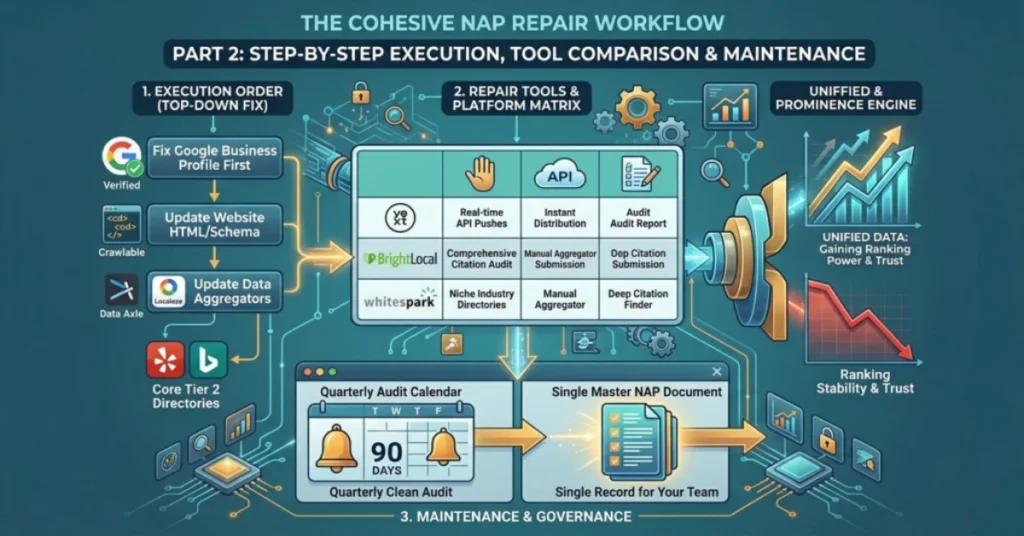
Fix your NAP top-down: Google Business Profile first, then your website, then aggregators, then directories. Fixing in random order lets aggregator feeds overwrite your manual edits. Follow this sequence and every fix holds.
Fix Google Business Profile First
Open your Google Business Profile dashboard and match all details with your canonical NAP, including your business name, address, phone number, website, and category. If your business moved or rebranded, Google triggers a verification step requiring a video of your premises. An unverified profile cannot push correct data into local search.
Update Your Website Contact Page and Footer
Display the canonical NAP in crawlable HTML text on every page footer and contact page. Never embed it inside an image. Add JSON-LD LocalBusiness schema markup so Google and AI crawlers like ChatGPT and Perplexity can read your details from the page source.
Fix Data Aggregators Before Directories
Update Data Axle, TransUnion Localeze ($99/year to lock your identity), and Foursquare before touching any individual directory. Their feeds overwrite manual fixes at the directory level. Fix aggregators first and those manual edits stay in place.
Update Core Directories After Aggregators
Claim and update Apple Maps, Bing Places, Yelp, and Facebook. Complete all profile fields including photos, categories, and descriptions to strengthen your local relevance signal.
Remove or Merge Duplicate Listings
Never edit a duplicate listing to match your canonical NAP. Two active listings can trigger spam filters and divide your local ranking authority. Submit a merge or removal request through the platform’s support channel and log it in your citation sheet with a follow-up date set 5 to 14 days out.
Where Your NAP Information Must Appear Online (Priority Order)
Your NAP must appear on 4 priority tiers: major search engines, high-authority directories, data aggregators, and niche platforms. Fixing them in this order maximises impact and prevents lower-tier fixes from getting overwritten. Most businesses make the mistake of starting with minor directories while leaving aggregators and core platforms untouched.
Where Your NAP Information Must Appear Online (Priority Order)
Your NAP must appear consistently across key online platforms for local search visibility. Search engines use this data to confirm your business identity and location. The order of citation placement affects local SEO performance.
Tier 1: Major Search Engines
Tier 1 includes Google Business Profile, Apple Maps, and Bing Places. These platforms drive most local traffic and power voice and navigation results. Claim and verify each listing manually.
Tier 2: High Authority Directories
Tier 2 includes Yelp, Facebook, Nextdoor, and the Better Business Bureau. These profiles often rank in Google search results and can create extra visibility on page one. A complete, consistent listing adds another search entry for your business.
Tier 3: Data Aggregators
Tier 3 includes Data Axle, TransUnion Localeze, and Foursquare. These systems push your business data to hundreds of directories and apps. One correct update here fixes many downstream listings.
Tier 4: Niche and Local Platforms
Tier 4 includes industry and local directories such as chambers of commerce and trade sites. Examples include Avvo, Healthgrades, and Houzz. These platforms strengthen relevance in your specific industry.
Best Tools to Fix and Monitor NAP Consistency
Five tools cover most NAP management needs: BrightLocal, Whitespark, Yext, Moz Local, and SEMrush Listing Management.
BrightLocal
Starts at $39/month per location. Best for agencies managing multiple clients. Runs citation audits and submits to aggregators. Manual submissions cost $2 to $3 extra per listing.
Moz Local
Starts at $14/month per location. Best for single-location small businesses. Automates listing distribution across major directories like Yelp, Apple Maps, and Bing. Review monitoring requires a higher plan.
Yext
Costs $499/year per location. Best for large enterprises with 100 or more locations. Real-time API pushes updates across hundreds of directories. Cancelling the subscription reverts all listings to old data.
Whitespark
Charges $4 to $5 per citation. Best for niche service businesses like plumbers, dentists, and solicitors. Focuses on finding industry-specific directories that broader tools miss.
SEMrush Listing Management
Included in premium SEMrush plans with fees per location. Best for in-house teams already using SEMrush. Covers citation distribution, duplicate suppression, and NAP monitoring in one platform.
NAP Mistakes That Keep Hurting Local Businesses
Six mistakes damage local rankings: keyword stuffing, PO boxes, ignoring aggregators, schema vs HTML mismatch, over-relying on automation, and forgetting secondary touchpoints.
- Keyword stuffing the business name means adding terms like “Smith Plumbing, Best Plumber Atlanta.” This violates Google’s guidelines and can trigger a profile suspension. Use your legal business name only.
- Using a PO box or virtual office creates a verification problem. Google cross-references addresses against postal databases and flags locations with no staff activity. Set up as a Service Area Business if you have no storefront.
- Mismatching schema and HTML means one NAP in your footer and a different format in your JSON-LD schema. This creates an entity conflict on your own domain. Pull both from one master record in your CMS.
- Over-relying on automated tools like Moz Local and Yext leaves gaps on smaller platforms like chamber websites and trade association listings. Combine automation with manual claiming of your top 30 to 50 platforms.
- Ignoring listings after a business change allows old details to persist on directories like Hotfrog, Cylex, and local business indexes. Run a full audit the same day any detail changes.
- Forgetting secondary touchpoints means outdated numbers survive in Google Ads call extensions, email signatures, and print materials. Update every touchpoint when any detail changes.
Multi-Location and Service-Area Businesses — Special NAP Rules
Multi-location brands and service-area businesses face NAP challenges that standard citation guides do not cover.
How Multi-Location Businesses Should Manage NAP
Each location needs its own GBP profile, unique local phone number, and a dedicated website page. Never copy the same content across pages and swap only the city name. Google filters duplicate pages and reduces their visibility. For businesses managing 10 or more locations, use the Google Business Profile API or bulk syndication tools to control all profiles from one central system.
How Service-Area Businesses Should Handle NAP Without a Public Address
Hide your address on GBP if you don’t serve customers at that location. Keeping a residential address visible can trigger a suspension. On directories like Yelp, Angi, and Thumbtack that require a physical address, use your verified mailing address. Google ranks your business from the centroid of your defined service area, so build dedicated pages for each city or postal code you cover.
What Happens After You Fix NAP Inconsistencies
After fixing NAP, Google rebuilds trust in your business entity and local rankings begin to stabilise.
How long does it take Google to detect NAP changes?
Most businesses see early ranking movement within 3 to 8 weeks. Full stabilisation takes up to 6 months. Fixes on platforms like Google Business Profile and Apple Maps reflect faster than corrections on minor directories like Hotfrog or Cylex.
How to Track Local SEO Improvements After Cleanup
Track 4 metrics: Local Pack rankings, GBP impressions, direct actions, and citation accuracy. Use BrightLocal’s Local Search Grid for geogrid ranking data. Check your GBP dashboard for direction requests, phone calls, and website clicks. Run audit search operators every 30 days to confirm no rogue listings have reappeared.
How to Prevent NAP Problems From Coming Back
NAP problems return when businesses update one platform and ignore the rest. Create one master NAP document and share it with everyone who manages your online presence agencies, developers, and internal staff. Any platform update must reference this document first.
How Often Should You Audit Your Citations
Single-location businesses should audit every 3 months. Multi-location businesses should audit every 6 months. Run a full audit the same day any business change happens. A quarterly check using Google search operators takes less than 30 minutes and catches new errors before they compound.
NAP Consistency Checklist for Local Businesses
Use this checklist after your initial cleanup, then revisit it every 3 months. Any unchecked item is an active ranking risk.
GBP and Website
- Business name matches legal registered name exactly
- Footer displays canonical NAP in crawlable HTML text
- JSON-LD LocalBusiness schema matches footer exactly
- Contact page shows canonical NAP with an embedded map
Aggregators
- Data Axle listing claimed and updated
- TransUnion Localeze profile verified and locked
- Foursquare listing claimed with correct details
Core Directories
- Apple Maps, Bing Places, Yelp, Facebook, and Nextdoor match canonical NAP
- No duplicate listings on any Tier 1 platform
- All profiles claimed with direct admin access
Duplicates and Monitoring
- Search operators run for all name, phone, and address variations
- All duplicates submitted for removal or merge
- Dynamic Number Insertion active on website
- Next audit date scheduled within 90 days
FAQs
What is NAP inconsistency in local SEO?
NAP inconsistency means your business Name, Address, and Phone number appear differently across platforms like Google, Yelp, and Apple Maps. Even small differences like “St” versus “Street” create conflicts that hurt your local rankings.
Does NAP inconsistency affect Google rankings?
Yes, NAP consistency is one of Google’s top 5 local ranking signals. Research shows consistent NAP data can influence local performance by up to 16%.
Can automated tools fix all my NAP problems?
No, Tools like Moz Local and Yext miss smaller platforms like chamber websites and trade listings. Combine automation with manual claiming of your top 30 to 50 priority platforms.
How often should I audit my citations?
Single-location businesses should audit every 3 months. Multi-location businesses should audit every 6 months. Run a full audit after any business change.
What is the risk of duplicate listings?
Duplicate listings split your local authority and trigger spam filters on platforms like Google, Yelp, and Bing. Always merge or remove duplicates rather than editing them.
How do tracking numbers affect NAP consistency?
Static tracking numbers in directories create conflicting phone signals. Use Dynamic Number Insertion so search bots only read your canonical number in the page source.
Conclusion
Small differences in your business name, address, or phone number across platforms like Yelp, Apple Maps, and Bing can make your data look unreliable to Google. The solution is to create one canonical NAP, audit all listings, fix aggregators first, and remove duplicates. Most businesses start seeing ranking improvements within 3 to 8 weeks.
NAP consistency is not a one-time task. Directories get updated, old data gets scraped, and changes can create new inconsistencies over time. A quarterly audit and a single master NAP record for your team helps prevent these issues from coming back.
Start by fixing your Google Business Profile, then work through other directories in order of importance. This helps close the gap between you and competitors already ranking above you.