


46% of all Google searches look for something nearby. Your potential customers are searching right now. But if your website lacks the right local keywords, a competitor gets that call instead of you.
Most small business owners target keywords that are too broad or too competitive. This means months of effort with no rankings and no new customers. The fix is not complicated. It only requires the right process.
This guide walks you through local keyword research from scratch. You will find keywords your city searches for. You will evaluate which ones to target first. Then you will map them to the right pages and optimize your Google Business Profile.
What Is Local Keyword Research and Why Does It Matter for SEO?
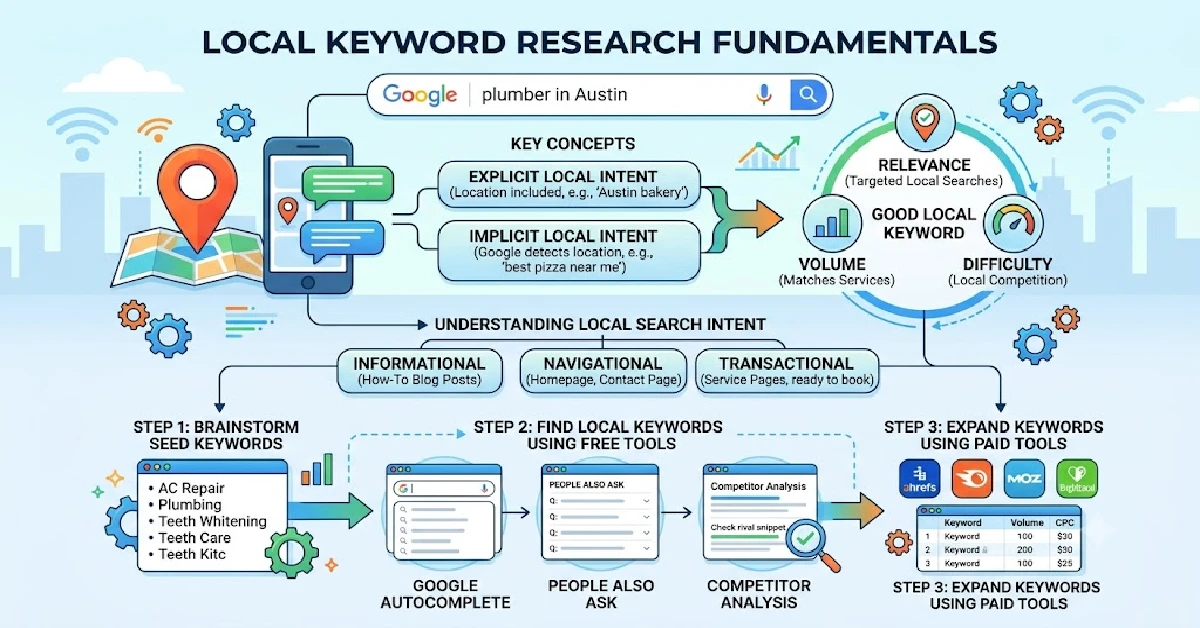
Local keyword research is the process of finding the exact search terms people in your city use to find businesses like yours on Google.
Instead of targeting “dentist,” you find “emergency dentist in Austin.” Instead of “plumber,” you find “affordable plumber in Brooklyn.” Each phrase is specific and local. You use those phrases to optimize your website and Google Business Profile. Regular SEO targets audiences across entire countries. Local keyword research targets people in a specific city who are ready to call, visit, or book today.
Between 76% and 88% of people who do a local search visit a business within 24 hours. For small businesses like dental clinics, roofing companies, law firms, and bakeries, the right local keywords turn search traffic into paying customers. You are not competing with every website on the internet. You are competing with 5 to 10 businesses in your area. That is a competition you can win.
Key Concepts You Need to Understand Before You Start
Three concepts shape every decision in local keyword research. Understand these before you open any tool.
Explicit vs. Implicit Local Intent
Explicit local intent means the searcher includes a location in the query. “Examples include searches like ‘plumber in Chicago’ or ‘dentist in Austin.’ In implicit local intent searches, users don’t include a location.” Examples: “emergency plumber” or “roof repair.” Google detects the searcher’s location via GPS and returns nearby results. Most beginners skip implicit keywords because tools label them as high-competition. Google localizes these results neighborhood by neighborhood. They are achievable for small businesses.
What Makes a Good Local Keyword
A good local keyword scores well on three criteria: relevance, volume, and difficulty. Relevance means the keyword matches what your business offers. Volume works differently in local SEO. A term with 30 monthly searches can generate 9 paying leads at a 30% conversion rate. Low volume is never a reason to skip a keyword. A nationally hard keyword may be easy to rank for locally. This happens when nearby competitors have weak profiles, thin content, or few reviews.
Understanding Local Search Intent
Search intent determines which page on your website should target a keyword. Informational queries like “how much does a roof replacement cost” belong on blog posts. Navigational queries like “Apex Dental Austin hours” belong on your homepage or location page. Transactional queries like “emergency drain cleaning Austin” belong on dedicated service pages. These searchers are ready to book right now.
Step 1 — Brainstorm Your Seed Keywords
Seed keywords are the core words that describe what your business does. They are your starting point before you open any tool.
List every service your business offers as a separate item. A plumbing business should not write “plumbing services.” It should write “water heater repair,” “drain cleaning,” “leak detection,” and “emergency pipe repair.” Then think like a customer. Customers search for problems, not industry terms. A parent does not search for “orthodontic malocclusion correction.” They search for “braces for overbite” or “how to fix crooked teeth.”
Once you have your raw list, apply one simple formula. Take your core service, add the problem, then add your city. “Plumber” becomes “emergency plumber.” Then it becomes “emergency plumber in Chicago.” Aim for 15 to 20 seed combinations before moving to any tool.
Step 2 — Find Local Keywords Using Free Tools
Four free Google tools give you enough data to build a solid local keyword list. You don’t need to spend any money.
Google Autocomplete
Type your seed keyword plus a location into Google, then add a letter at the end. “Plumber in Austin a,” then “plumber in Austin b,” and so on. Google fills in the most searched variations. For neighborhood ideas, try “dentist in Austin West Lake” or “roofing company Denver Highlands.” These hyperlocal phrases rarely appear in paid tools. But they represent real buyers in your area.
Google Keyword Planner
Enter your seed keywords and remove the default national location. Replace it with your target city. This shows actual local search volume instead of misleading national numbers. A keyword with 5,000 monthly national searches may show only 90 in your city. That local number is the one that matters.
Google Search Console
Google Search Console is the most underused free tool in local SEO. Open the Performance tab and set the date range to 90 days. Filter queries by your city name and sort by impressions. Find keywords in positions 4 to 15 with low click-through rates. These are pages Google already links to your business. Small improvements to the title tag can push them into the top 3.
Google Trends
Google Trends shows how keyword demand shifts by season and region.Search for “AC repair” and “furnace maintenance” together. You will see clear seasonal patterns emerge. For businesses like HVAC companies, landscapers, and tax accountants, this data shows exactly when to publish new content and when to push specific service pages.
Step 3 — Expand Your List Using Paid Tools
Free tools are enough to start. But paid tools give you competitor data, keyword clustering, and local rank tracking that free tools cannot match.
Semrush and Ahrefs
Semrush and Ahrefs are the two most widely used tools for local keyword research. Semrush’s Keyword Magic Tool searches a database of over 24 billion keywords. It groups related modifiers like “emergency,” “affordable,” and “24 hour” automatically. Ahrefs excels at finding keyword gaps. Enter your domain alongside three local competitors. Its Content Gap tool shows every keyword your rivals rank for that your site misses.
BrightLocal and Whitespark
BrightLocal and Whitespark help businesses manage local SEO. BrightLocal’s Local Search Grid maps your rankings across a physical coordinate grid. It shows exactly where your visibility drops as the distance from your address increases. Whitespark focuses on citation tracking. It helps you find niche directories and competitor citation profiles that build local authority.
Ubersuggest and LowFruits
For small businesses on a tight budget, Ubersuggest and LowFruits are cost-effective options. Ubersuggest provides long-tail keyword suggestions, search volume, and difficulty scores. LowFruits finds keywords where low-authority sites and Reddit threads rank on page one. These are the keywords a new local website can target without a strong backlink profile.
Step 4 — Analyze What Your Local Competitors Rank For
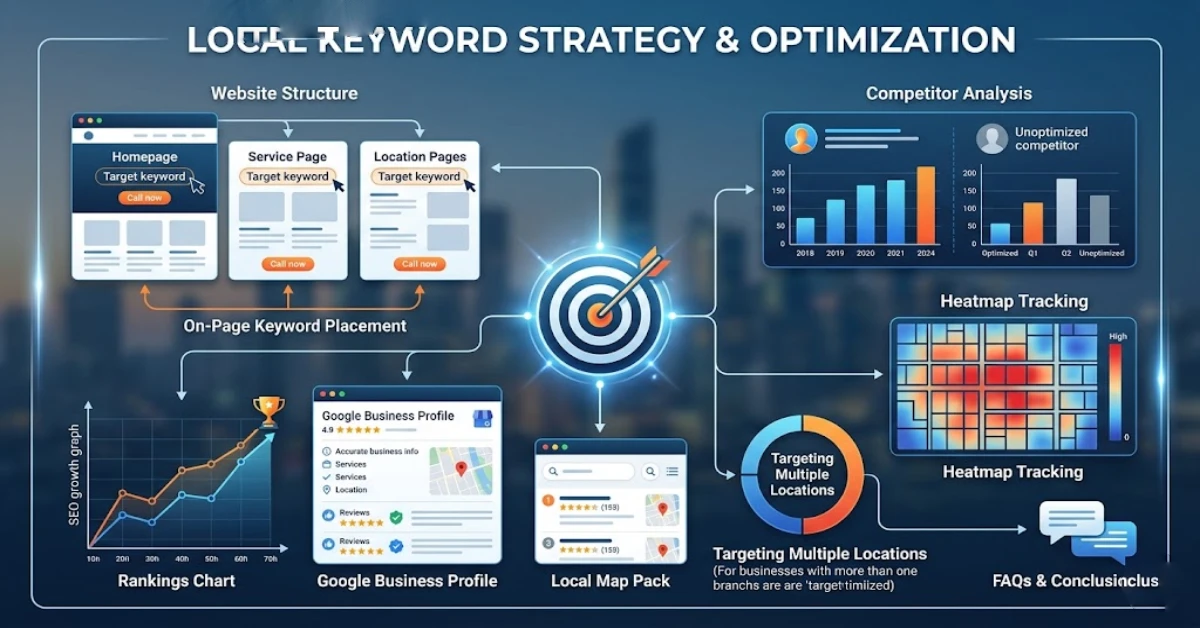
Your rivals have already tested which keywords drive traffic. Competitor research is one of the fastest ways to build a local keyword list.
Start with free methods. Search your primary service keyword in Google, like “Houston cosmetic dentist” or “Austin emergency plumber.” Open the top 3 organic results. Check their title tags and H1 headings. Competitors who rank place their highest-value keywords in these exact locations. Also check their Google Business Profile primary category. It carries significant ranking weight in the local pack.
For deeper research, use Ahrefs or Semrush. Enter a competitor’s domain and open their organic keywords report. Filter for positions 1 to 10. Run this for your top 3 local competitors. Any keyword where 2 or more competitors rank on page one and your site does not is a content gap. Create a dedicated page for each gap. You will close the competitive distance faster than any other method in local SEO.
Step 5 — Evaluate and Prioritize Your Keyword List
After research, you will have hundreds of keyword ideas. Most local businesses only need 20 to 40 primary keywords to capture 80% of their relevant local search traffic.
Apply three filters to every keyword. Score relevance from 1 to 3 based on how closely it matches a profitable service you offer. Check difficulty by looking at competitor content, reviews, and Google Business Profile quality. Verify volume using Google Search Console or Google Keyword Planner to confirm active local impressions exist.
Separate your final list into two groups. Quick wins are high-relevance, low-competition keywords your site already ranks for in positions 4 to 15. Target these first. Long-term targets are high-volume implicit terms like “dentist,” “plumber,” and “electrician.” These require time and authority to rank for. Both groups belong in your strategy. Quick wins generate results while long-term targets are still building.
Step 6 — Map Keywords to the Right Pages on Your Website
Keyword mapping means giving each keyword one specific page on your website.Google ranks individual web pages rather than entire websites. Putting every local keyword on your homepage limits your ranking potential.
Which Keywords Go Where
Each page type serves a specific keyword category. Your homepage targets your primary service and main city. Example: “Family Dentist in Austin TX.” Service pages target specific service and location combinations.Examples include “dental implants Austin” or “teeth whitening Cedar Park.” Businesses serving multiple areas use location pages to target city and neighborhood keywords.
Blog posts cover informational and long-tail queries. Examples: “how much does a root canal cost in Austin” or “what to do in a dental emergency.” Never place a transactional keyword on a blog post. It belongs on a service page.
How to Avoid Keyword Cannibalization
Keyword cannibalization happens when multiple pages target the same keyword. This makes it difficult for Google to decide which page is most relevant. Both pages rank lower than either would alone. To check for it, search Google using: site:yourdomain.com “target keyword.” If multiple pages appear for the same term, you need to consolidate them. Merge the overlapping pages into one strong page. Then set up a 301 redirect from the old URL to the new one.
Multi-Location and Service Area Businesses
Businesses serving multiple cities need one dedicated location page per city. A common mistake is creating identical pages with only the city name swapped out. Google detects this duplication and ranks these pages poorly.Each location page should include unique content. Include a local phone number, a specific address, and customer reviews from that city. Add an FAQ section covering local regulations or regional factors for that area.
Types of Local Keywords You Should Be Targeting
A complete local keyword strategy covers six keyword types. Each type captures a different buyer at a different stage of their search.
City and Service Combinations
These are the foundation of local SEO. Phrases like “chiropractor in Miami,” “Austin roof repair,” and “emergency locksmith Denver” carry strong transactional intent. They belong on your core service and location pages.
Implicit Local Intent Keywords
Implicit keywords like “emergency plumber,” “roof repair,” and “walk-in dentist” contain no city name. But they trigger local results. Searches without geo-modifiers have grown by 150% in recent years. Most beginners overlook these terms. That is a mistake.
Hyperlocal and Neighborhood Keywords
Phrases like “dentist in Soho,” “plumber in Brooklyn Heights,” and “HVAC repair Bucktown Chicago” target buyers in your immediate area. In large cities, residents rarely travel across town for routine services. Neighborhood-level terms convert better than city-wide terms.
“Near Me” Keywords
Google does not rank your page higher for containing the words “near me.” It uses GPS to find nearby verified businesses. The correct strategy is maintaining a complete Google Business Profile. Keep your name, address, and phone number consistent across all platforms. Earn reviews that mention local landmarks and neighborhoods.
Long-Tail Local Keywords
Phrases like “how much does emergency water damage restoration cost in Austin” have low search volume. But they convert at high rates because the searcher is in the final decision stage. These terms also align with voice search queries, which tend to be longer and question-based.
Seasonal and Event-Based Keywords
Keywords like “emergency furnace repair Denver winter” and “AC tune-up Austin summer” capture demand spikes. Publish seasonal content 6 to 8 weeks before the peak period. This gives Google enough time to index and rank your page before competitors react.
Where to Place Local Keywords on Your Website
Local keywords belong in seven places on every page you want to rank. On-page signals account for 36% of local organic ranking influence.
- Title Tag: Place your primary keyword and city at the front. Example: “Emergency Plumber in Austin TX | Apex Plumbing Group.” Keep it under 60 characters to avoid truncation.
- Meta Description: Include a secondary keyword and a clear local call to action. Example: “Need an emergency plumber in Austin? Apex Plumbing offers 24/7 same-day repairs. Call now.” Stay under 155 characters.
- H1 and Subheadings: Every page needs exactly one H1 containing the primary keyword. Use H2 and H3 subheadings to include location synonyms and problem-based variations. Example: “Rapid Water Heater Repair in West Lake Hills.”
- Page Body: Weave keywords into the copy naturally. Mention nearby landmarks, major streets, and local neighborhoods to build geographic context. Never force the same phrase repeatedly.
- URL Structure: Keep URLs clean and keyword-specific. Correct: domain.com/austin/emergency-plumbing. Incorrect: domain.com/page1?loc=92834.
- Image Alt Text: Add descriptive, localized alt text to every image. Example: “Apex Plumbing technician repairing a water heater in Austin TX.”
- Internal Links: Link service pages, location pages, and blog posts to each other. Use descriptive anchor text like “emergency plumbing services in Austin.” Never use generic phrases like “click here.”
How to Optimize Your Google Business Profile With Local Keywords
Your Google Business Profile is not separate from your website. Together they form a single local search presence. You must align keywords across both. 44% of all local search clicks go to the Google Local 3-Pack. Your GBP is what gets you there.
Your primary category is the single most influential ranking factor in the local pack. It must match your most profitable service. A plumbing business should select “Plumber,” not “Contractor.” Add up to 2 secondary categories.Examples include “Drain Cleaning Service” and “Water Heater Installation.” Include your primary keyword, city, and main value proposition within the first 250 characters of your business description. Add every service from your keyword research as a separate item. Write a unique 100 to 300 word description for each one.
Use Google Posts weekly to highlight services and promotions. Link each post back to the relevant service page.In the Q&A section, add frequently asked customer questions and provide answers that include relevant keywords. Avoid stuffing keywords into your business name. Adding phrases like “Best Plumbers Austin TX” to your profile name violates Google’s guidelines. It is the primary trigger for profile suspension.
How to Track Your Local Keyword Rankings
Standard rank tracking tools report a national average position. That number is not useful for local SEO. Local search results shift block by block based on the searcher’s GPS location. A plumber may rank first for “drain cleaning” from one street away but drop to tenth from three miles north.
Use these tools to track local rankings:
- BrightLocal, Local Falcon, and Nightwatch simulate searches from a grid of GPS coordinates. They produce visual heatmaps showing where your rankings are strong and where they drop off.
- Google Search Console monitors real-world impressions and clicks. Open it monthly and filter queries by your city name. A rise in impressions confirms your pages are gaining visibility.
- Whitespark and DemandSphere track rankings across specific ZIP codes. These are useful for businesses serving multiple neighborhoods or districts.
Maintain your rankings with these habits:
- Review and refresh your keyword research every 3 to 6 months. Local markets shift and seasonal demand changes regularly.
- If a service page sits in positions 11 to 15 for 3 months, the content needs more depth or stronger local signals.
- Monitor whether AI Overviews appear for your target keywords. If an AI Overview cites a competitor, add structured FAQ content and build stronger local citation density.
Common Local Keyword Research Mistakes to Avoid
Most local businesses lose rankings because of what they do wrong, not what they fail to do.
- Chasing high-volume national terms. Broad terms like “plumbing” or “dentistry” pit small businesses against directories like Yelp, Angi, and HomeAdvisor. Focus on low-volume, high-intent local terms instead.
- Stuffing “near me” into page content. Writing “we are the best plumber near me” signals keyword stuffing to Google. Proximity rankings come from a verified GBP, consistent NAP data, and local schema markup.
- Using the same keyword on every page. Targeting “Austin plumber” on your homepage, service pages, and blog creates cannibalization. Google ranks all of them lower as a result.
- Ignoring implicit local intent. Skipping terms like “emergency plumber” or “roof repair” is a missed opportunity. Google localizes these results neighborhood by neighborhood.
- Skipping competitor research. Building a keyword strategy without analyzing local competitors means starting from zero. Competitor data provides a ready-made blueprint.
- Treating keyword research as a one-time task. Local markets and seasonal demand shift constantly. Keyword research becomes outdated after 6 months.
- Running the website and GBP optimization separately. Your page content and GBP categories must align. Treating them as separate projects limits both organic and local pack performance.
FAQs
What is local keyword research?
Local keyword research is the process of finding search terms people in a specific city use to find businesses like yours. It focuses on location-based phrases like “dentist in Austin” rather than broad national terms.
How does local keyword research differ from regular keyword research?
Yes, Regular keyword research targets broad national audiences. Local keyword research targets buyers in a specific city or service area with much higher conversion intent..
How long does it take to rank for local keywords?
Most businesses see ranking improvements within 3 to 6 months of consistent optimization. Competitive markets like legal services and dental care may take 6 to 12 months.
What happens if I target the same keyword on multiple pages?
Keyword cannibalization occurs and Google cannot determine which page is most relevant. Both pages rank lower than either would alone.
Should you include “near me” keywords in your website content?
No, Google does not rank pages higher for containing “near me.” Proximity rankings come from a verified GBP, consistent NAP data, and local schema markup.
Conclusion:
Local keyword research is the foundation of every successful local SEO strategy. You now have a complete process: brainstorm seed keywords, find and expand your list using free and paid tools, analyze competitors, prioritize by relevance and difficulty, map keywords to the right pages, and align everything across your website and Google Business Profile.
The businesses ranking locally are not the biggest or the oldest. They are the ones that understood what their customers searched for and built their online presence around those exact terms. Revisiting your keyword strategy every 3 to 6 months keeps you ahead of competitors, seasonal shifts, and market changes.
Start today. Open Google, type your core service plus your city, and see what Autocomplete suggests. That first list of phrases is your starting point. Ready to go further? Audit your Google Business Profile, identify your first 5 quick-win keywords, and build from there one page at a time.

17 June 2026
Local Business Listing Management: Complete Guide

17 June 2026