

76% of people who search for a local business on mobile visit one within 24 hours. Your competitors are capturing those customers. You are not showing up at all.
You added “near me” to your website. Your rankings did not move. That phrase means nothing to Google. Google uses your customer’s phone location to find nearby businesses. Every day you stay invisible, a competitor takes that call instead.
This article explains what near me keywords are and how Google processes them. You will learn how to optimize your Google Business Profile, use location keywords, earn reviews, and track your local rankings.
What Are Near Me Keywords?
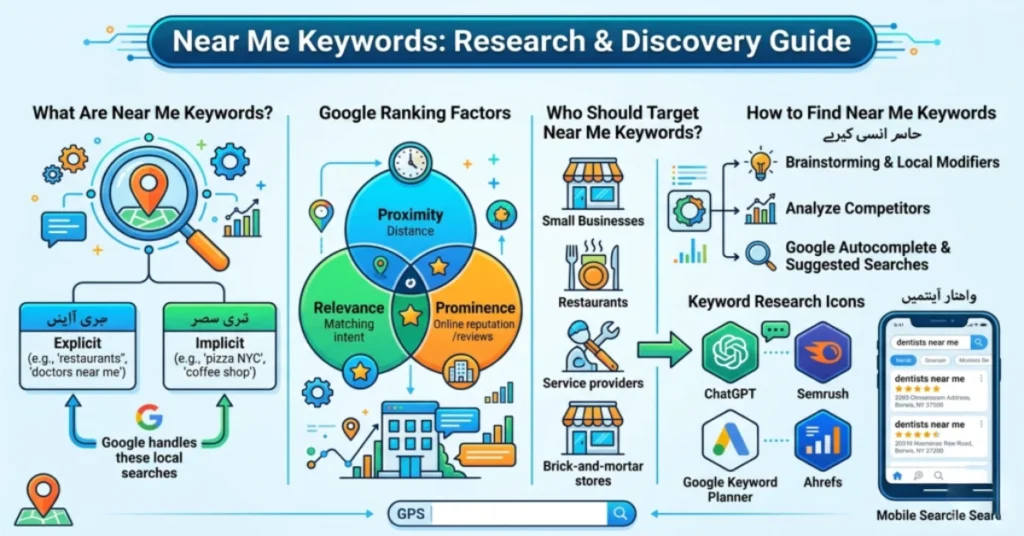
Near me keywords are search queries people use to find businesses close to their location. Phrases like “dentist near me,” “emergency plumber nearby,” and “coffee shop open now” are all near me keywords. They signal one clear intent: the searcher wants a local result right now.
These keywords carry strong purchase intent. Another 28% complete a purchase directly from that search. Over 46% of all Google searches carry local intent. Search volume for near me phrases has grown over 900% in recent years.
Explicit Near Me Keywords
Explicit near me keywords contain a direct location modifier. Examples include “emergency plumber near me,” “vegan restaurant nearby,” and “urgent care open now.” The searcher has already decided what they need. They are now choosing who will provide it.
Implicit Near Me Keywords
Implicit near me keywords contain no location modifier. But Google still treats them as local searches. When someone types “mechanic,” “dentist,” or “electrician” on a mobile device, Google uses their GPS location. It triggers the local map pack automatically. Most people never type “near me.” They expect Google to figure out the location. A business that ignores implicit keywords misses the larger share of local search traffic.
How Google Handles Near Me Searches
Google does not match the text “near me” on your webpage. It uses your device’s real-time location to find nearby businesses. GPS coordinates, Wi-Fi signals, and cellular data tell Google where the searcher stands. The search engine then pulls businesses from the local map pack.
Adding “near me” to your page title or headings does not help rankings. It looks spammy and can trigger spam filters. Use city and service keywords instead.
When a local search runs, Google shows the local map pack. This is a block of 3 business listings with a map. It sits above all organic results. Most users get the address, phone number, hours, and reviews directly from this block. The searcher calls or gets directions straight from the map pack.
Google ranks businesses in the map pack using 3 factors:
Proximity
Proximity refers to how close your business is to the searcher’s location. A business 2 blocks away ranks above a stronger business 2 miles away. Rankings shift as the searcher moves. A business ranking first from one street can drop to third from the next block. Proximity is heavily weighted but it is not the only factor.
Relevance
Relevance measures how closely your listing matches what the user is searching for. Google scans your Google Business Profile, website, and reviews. A search for “emergency water damage restoration” bypasses closer general contractors. It favors a business that clearly lists 24/7 restoration services. Complete and specific profile information builds strong relevance signals.
Prominence
Prominence measures how well-known and trusted your business is. Google builds this score from 4 signals. The volume and quality of inbound links to your website. The quantity and rating of reviews on Google, Yelp, and Apple Maps. The accuracy and consistency of your business details across directories. And your overall domain authority. A highly prominent business can outrank a closer competitor with weak authority and few reviews.
Who Should Target Near Me Keywords?
Any business that serves customers at a physical location should target near me keywords. Storefront businesses like restaurants, dental clinics, hair salons, and retail stores depend on foot traffic. Near me optimization is their primary source of new customers from search.
Service area businesses like plumbers, electricians, and house cleaners also benefit. They travel to the customer instead of hosting them. Google allows them to hide their physical address and define service boundaries by city, ZIP code, or neighborhood. An SAB with no public address can still rank for near me searches. Google uses the hidden verification address to run proximity calculations.
Near me, targeting does not apply to every business. Purely digital businesses like SaaS platforms, online-only stores, and remote service providers have no local footprint. Google does not allow these businesses to create a Google Business Profile. They should focus on standard organic SEO instead.
Local Keyword Examples for Near Me Searches
Local near me keywords follow 3 main formats. Explicit proximity phrases, city plus service combinations, and implicit category queries. Explicit phrases include “emergency plumber near me” and “pediatric dentist open now.” City plus service combinations include “brake service Detroit” and “HVAC repair Denver.” Implicit queries like “mechanic” or “dentist” trigger local results without any location modifier.
The city plus service format is the most practical starting point. Pair your core service with a city name or neighborhood. Use it in your title tags, H1 headings, and location pages. Examples of these searches include “family lawyer Brooklyn” and “water heater replacement Chicago.”
Intent matters too. Transactional keywords like “emergency roof repair Boston” signal immediate need. They convert at the highest rate. Informational keywords like “average cost of kitchen remodeling in Boston” build awareness but convert lower. Prioritize transactional keywords for service pages.
How to Find Near Me Keywords for Your Business
Finding near me keywords follows a 4-step process. Brainstorm core services, add location modifiers, expand through research tools, and cluster keywords by intent and page.
Step 1: List your core services. Write down every service your business offers. Use the words your customers use, not internal business terms. Pull language from reviews, inquiry emails, and call notes. A plumber’s list might include “drain unblocking,” “water heater repair,” and “burst pipe fix.”
Step 2: Add location modifiers. Pair each service with your target cities, neighborhoods, and ZIP codes. “Water heater repair” becomes “water heater repair Dallas,” “water heater repair Oak Cliff,” and “water heater repair 75201.”
Step 3: Expand using research tools. Run your seed terms through Google Keyword Planner or Semrush Keyword Magic Tool. Filter by location to get accurate local search volumes. Check Google Search Console to find implicit keywords already driving visibility to your site.
Step 4: Cluster and map keywords to pages. Group related keywords by intent and location. Assign each cluster to one dedicated page. Never target the same city keyword across multiple pages. That creates self-cannibalization and splits your ranking potential.
Also run a keyword gap analysis. Use the Semrush Keyword Gap Tool to compare your domain against your top 3 local competitors. This shows the exact keywords they rank for that your site currently misses.
Can You Use ChatGPT for Near Me Keyword Research?
ChatGPT helps with ideation but cannot replace keyword tools. Use it to generate local landmarks and neighborhoods, sort keyword data by intent, and model voice search phrases. ChatGPT cannot provide search volumes, keyword difficulty scores, or live SERP data. Validate every suggestion in Google Keyword Planner or Semrush before building content around it.
Best Tools for Near Me Keyword Research
Finding the right near me keywords requires the right tools. These 5 tools cover everything from keyword discovery to block-by-block local rank tracking.
- Google Keyword Planner filters search volume by city, county, or metro area. It provides accurate local volume estimates rather than national averages.
- Semrush Keyword Magic Tool expands seed phrases into long-tail variations. Use filters to identify local, question-based, and transactional keywords.
- Semrush Keyword Gap Tool compares your domain against up to 4 competitors. It finds the exact local keywords competitors rank for that your site misses.
- Semrush Map Rank Tracker places a pin grid over your target area. It scans Google Maps at every coordinate point. It shows where your business ranks block by block.
- Semrush Position Tracking Tool monitors rankings at the ZIP code level on mobile and desktop. This gives accurate local data that matches real searcher behavior.
How to Optimize for Near Me Searches
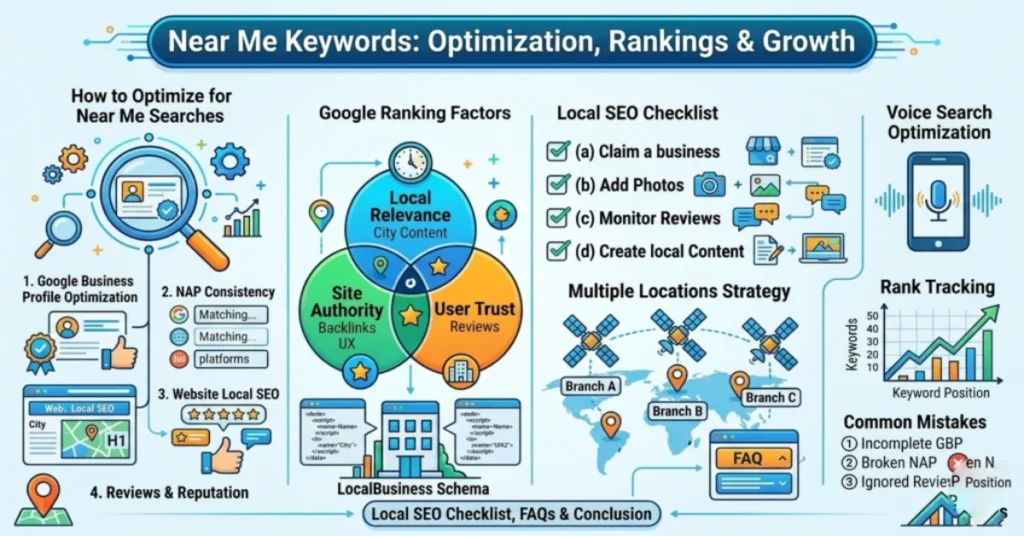
Ranking for near me searches requires optimization across 5 areas. Google Business Profile, NAP consistency, website content, customer reviews, and schema markup.
Optimize Your Google Business Profile
Your Google Business Profile is the single most important factor for appearing in the local map pack.
Verify your profile first. This signals ownership and authority to Google. Then complete every field. Businesses with complete profiles get 7 times more clicks than businesses with incomplete ones.
What to do:
- Choose the most specific primary category. Select “Pediatric Dentist” or “Orthodontist” rather than just “Dentist.” Add up to 9 secondary categories to capture related searches.
- Post high-resolution photos of your exterior, interior, staff, and completed work regularly.
- Keep hours accurate. Update holiday hours and seasonal changes immediately. An outdated listing loses the lead.
- Publish weekly GBP posts. Share promotions, updates, and project summaries.
- For SABs: hide your residential address and define service boundaries by city, ZIP code, or neighborhood.
Keep Your NAP Consistent Across the Web
NAP refers to your business’s Name, Address, and Phone number. Inconsistent NAP data directly damages your local map pack rankings.
When Google finds different versions of your business name or phone number across Yelp, Apple Maps, and Bing Places, its confidence drops. This lowers your prominence score and map pack position.
What to do:
- Create one master NAP record. Match it character for character across every platform.
- Claim and clean listings on Yelp, Apple Business Connect, and Bing Places. These 3 platforms feed data to Apple Maps, Siri, and Amazon Alexa.
- Add your business to local chambers of commerce directories. These carry high regional authority.
- Find and remove duplicate listings. Duplicates split ranking authority and confuse search crawlers.
Use Location Keywords on Your Website
Use city plus service keywords in your title tags, H1 headings, meta descriptions, and body copy. Do not write “near me” anywhere in your content. It adds no ranking value and looks spammy. Write the actual location instead.
How to place keywords:
- Title tag: “Emergency Plumber in Denver, CO | Brand Name” (under 60 characters)
- H1 heading: “Professional Plumbing Services in Denver”
- Meta description: include your city name and a clear call to action (under 155 characters)
- Body copy: reference neighborhoods, county names, and local landmarks naturally
Create a separate location page for each city your business serves.Each page must be unique. Include local reviews, project photos, driving directions, and an embedded Google Map. Never copy a page template and swap only the city name. Google penalizes thin, duplicate location pages.
Build and Manage Customer Reviews
Customer reviews are a direct ranking signal for the local map pack. High volume, high ratings, and recent review dates strengthen your prominence score.
What to do:
- Ask at the right moment. Send an automated text or email with a review link after a positive service experience.
- Encourage location-specific reviews. Ask customers to mention their neighborhood or city. A review mentioning “The team fixed my boiler in Aurora” provides Google with evidence that your business serves that area.
- Respond to every review. Include the service name and location naturally: “Thank you for trusting us with your AC repair in Arvada.”
Add LocalBusiness Schema Markup
LocalBusiness schema is code added to your website backend. It gives Google machine-readable facts about your business. It confirms your name, address, coordinates, hours, and service areas. It does this without changing anything visible on the page. Schema markup gives pages a 2.5 times higher chance of being cited in AI-generated search answers.
What to do:
- Add schema in JSON-LD format.
- Include your business name, address, phone number, geo coordinates, opening hours, and service area.
- Match every detail exactly to your Google Business Profile and contact page.
- Validate the code using Google’s Rich Results Test before publishing.
How to Handle Multiple Locations
Businesses with multiple locations need a separate location page, a separate Google Business Profile, and a separate keyword set for each location.
Use subfolders to organize location pages. Subfolders keep all authority on your main domain. The correct structure looks like this: yoursite.com/locations/denver/ and yoursite.com/locations/phoenix/. Subdomains split authority and require separate link building for each location.
Each location page must be unique. Include that location’s team photos, customer reviews, driving directions, and an embedded Google Map.Avoid copying a page template and only changing the city name. Google de-indexes thin, duplicate location pages. Each location also needs its own verified Google Business Profile. NAP details must match the location page exactly.
Target a unique keyword set for each location. Use “HVAC repair Denver” on the Denver page and “HVAC repair Aurora” on the Aurora page. Never target the same city keyword across multiple pages. This causes keyword cannibalization and splits your ranking potential.
Near Me Keywords and Voice Search
Near me searches and voice search are directly connected. 58% of consumers use voice search to find local businesses. 76% of those searches convert to a visit or booking within 24 hours.
Voice searches tend to be longer and more conversational than typed queries.. A person typing writes “plumber Chicago.” The same person speaking to Google Assistant says “Hey Google, who can fix my leaking pipe near me?” The intent is identical. The phrasing is completely different. Add a FAQ section to your location pages. Write questions and answers in natural spoken language that matches how people talk.
Different voice assistants rely on different data sources. Google Assistant uses Google Business Profile. Apple Siri uses Apple Maps and Yelp. Amazon Alexa uses Bing Places and Yelp. A business optimized only on Google stays invisible to Siri and Alexa users. Claim profiles on Google Business Profile, Apple Business Connect, and Bing Places to stay visible across all 3 platforms.
How to Track Your Near Me Keyword Rankings
Standard rank trackers give inaccurate data for near me searches.They check rankings using a single IP address .They miss the block-by-block shifts that happen in local search. A business ranking first from one street can drop to fourth from the next.
Use location-specific tools instead. Semrush Map Rank Tracker places a pin grid over your target area and scans Google Maps at every coordinate point. Semrush Position Tracking Tool monitors rankings at the ZIP code level on mobile and desktop. Set it to track mobile. Most “near me” searches are performed on mobile devices.
Also monitor performance signals inside your Google Business Profile dashboard.Monitor phone calls, direction requests, and website clicks. These show real customer behavior. Use Google Search Console to find implicit local keywords already generating impressions. Filter by location and sort by impressions to find unoptimized terms worth targeting.
Does Near Me SEO Still Work?
Near me, SEO still works. But the goal has shifted. It is no longer just about ranking on page 1. It is about appearing inside map packs, AI summaries, and voice search results.
The local search environment is now driven by zero-click behavior.Most local searches don’t lead to a website click because users get key details directly from the map pack or AI results. When AI Overviews appear, zero-click searches increase to 83%. In full AI Mode searches, it hits 93%.
This does not mean local SEO is dead. Clicks that reach a website convert 23% higher than average. They come from highly qualified, ready-to-act searchers. Businesses cited inside AI Overviews see a 35% increase in organic clicks and a 91% increase in paid clicks. The map pack and AI summaries are now the primary visibility targets.
To stay visible as search evolves, focus on 4 things.Keep your Google Business Profile complete and up to date. Collect location-specific reviews. Add LocalBusiness schema markup. Maintain accurate NAP data across all directories. These 4 actions build the trust signals Google and AI models use to recommend local businesses.
Common Near Me Keyword Mistakes to Avoid
Most near me SEO failures come down to 6 mistakes.
1. Stuffing “near me” into page content. Google uses device location, not page text. Adding “near me” to titles and headings looks spammy and adds zero ranking value.
2. Incomplete or unverified Google Business Profile. An incomplete profile cannot compete in the map pack. Fill every field and verify your address.
3. Inconsistent NAP across platforms. Different name, address, or phone number versions across Yelp, Apple Maps, and Bing Places confuse Google and lower your prominence score.
4. Thin or duplicate location pages. Pages that only swap the city name get de-indexed. Each location page needs unique photos, reviews, and local details.
5. Using standard rank trackers. Basic trackers check from a single IP address and miss local ranking shifts. Use Semrush Map Rank Tracker or Position Tracking Tool instead.
6. Ignoring implicit local keywords. Category searches like “plumber” or “dentist” trigger the same map pack as “plumber near me,” so ignoring them means losing a large share of local traffic.
Local SEO Keyword Research Checklist
Use this checklist to audit and build your near me keyword strategy across 6 core areas.
Google Business Profile
- Verify profile ownership and confirm your base address
- Select the most specific primary category and add up to 9 secondary categories
- Update operating hours including holidays and seasonal changes
- Upload high-resolution photos of your location, staff, and completed work weekly
- For SABs: hide residential address and define precise service area boundaries
NAP Consistency
- Create one master NAP record with your exact name, address, and phone number
- Claim and clean listings on Yelp, Apple Business Connect, and Bing Places
- Fix any incorrect address or phone number variations across all platforms
- Find and remove duplicate listings across directories
Keyword Research
- List all core services using the exact language your customers use
- Pair each service with target cities, neighborhoods, and ZIP codes
- Run seed terms through Google Keyword Planner and Semrush Keyword Magic Tool
- Identify implicit category keywords that trigger local map pack results
- Run a keyword gap analysis against your top 3 local competitors
On-Page SEO
- Place city plus service keywords in title tags, H1 headings, and meta descriptions
- Create a unique location page for every city or neighborhood you serve
- Include local reviews, project photos, and an embedded Google Map on each page
- Add natural references to neighborhoods, landmarks, and county names in body copy
Reviews
- Set up automated SMS or email review requests after every completed service
- Ask customers to mention their specific neighborhood or city in the review
- Respond to every review and include the service name and location naturally
Schema and Tracking
- Add LocalBusiness JSON-LD schema to every location and service page
- Match schema details exactly to your Google Business Profile and contact page
- Validate schema using Google’s Rich Results Test before publishing
- Track keywords at ZIP code level using Semrush Position Tracking Tool
- Run geogrid scans with Semrush Map Rank Tracker to map local pack visibility
- Track calls, direction requests, and clicks in your GBP dashboard each month.
FAQs
How do I use keywords near me?
Use city plus service keywords in your title tags, H1s, and location pages.Avoid using “near me” in your website copy. Google uses device location, not page text, to determine proximity.
What is an example of a local SEO keyword?
Emergency plumber in Denver” is a local SEO keyword. Other examples include “pediatric dentist Austin TX” and “HVAC repair Brooklyn.”
What are the best tools for near me keyword research?
Google Keyword Planner and Semrush Keyword Magic Tool cover keyword discovery. Semrush Map Rank Tracker and Position Tracking Tool handle local rank monitoring at the block and ZIP code level.
Can I use ChatGPT for keyword research?
ChatGPT helps brainstorm local landmarks and voice search phrasing but cannot provide search volumes or live SERP data. Validate every suggestion in Google Keyword Planner or Semrush before building content.
How long does it take to rank for near me keywords?
Most businesses see measurable improvements within 3 to 6 months. Competitive markets like legal or medical services can take 6 to 12 months.
Conclusion
Near me keywords connect local businesses with ready-to-act customers searching for immediate solutions.Google determines these searches based on device location, not page content. The businesses that appear in the local map pack win on 3 factors: proximity, relevance, and prominence. A complete Google Business Profile, consistent NAP data, strong reviews, and location-specific website content control all 3.
Both explicit keywords like “plumber near me” and implicit keywords like “plumber” trigger the same map pack. Targeting only explicit phrases leaves the larger share of local traffic uncaptured. As AI Overviews and zero-click behavior reshape the local SERP, structured data, clean citations, and active review management become the core visibility drivers.
Ready to rank for near me searches in your area? Start with your Google Business Profile. Verify it, complete every field, and match your NAP details across every directory where you have a listing. That single step builds the foundation on which everything else depends.
18 June 2026
How to Do Local Keyword Research (Complete Guide...
18 June 2026