
How to Use Google Keyword Planner for Local SEO
How to Use Google Keyword Planner for Local SEO Around 46% of Google searches focus on finding local information. But most local businesses target the wrong keywords. You open Google Keyword Planner and pull data. The numbers look good. Then you realize the data covers the entire country, not your city.
You build pages around those keywords. Nothing ranks. Your competitors keep showing up. You keep getting skipped. The problem is not your business. You are using a powerful local SEO tool without the right settings.
This guide fixes that step by step. You will learn how to access the tool for free, set location filters, read local keyword data, identify city-service combinations, and map keywords to the right pages on your site.
What Is Google Keyword Planner and Why Does It Matter for Local SEO
Google Keyword Planner is a free tool inside Google Ads. It helps you find keywords, check search volumes, and understand what local customers search for.
Most people think it is only for running ads. It is not. Local service businesses like plumbers, HVAC companies, and law firms use it to find the exact phrases customers type before hiring someone. The tool pulls data from Google’s own search database. That makes it the most accurate free keyword source available.
For local businesses, national data is misleading. A keyword like “water heater repair” may get 50,000 searches nationwide, but only 90 in your city. Google Keyword Planner lets you filter by city, region, or service area. Your content then targets real local demand. It gives you three key data points: average monthly search volume, advertiser competition level, and top-of-page bid estimates.Anyone with a Google account can use it for free. You don’t need to spend on ads.
How to Use Google Keyword Planner for Free
You can access Google Keyword Planner for free with a Google account. You don’t need to run any ads to use it.
Go to ads.google.com and sign in. When Google asks you to set up a campaign, select Expert Mode at the bottom of the screen. This shows a Skip campaign creation option. Click it. Complete your basic business details and you are in. Google may ask for billing information to verify your account. It will not charge you as long as no active campaign is running.
Once inside, open the Tools menu at the top of the page. Click Planning and then Keyword Planner. The tool is ready to use at no cost. Free access gives you search volume ranges like 100 to 1,000 or 1,000 to 10,000. It does not show exact numbers. An active Google Ads account with real ad spend unlocks exact monthly volumes and detailed forecasts. For most small business owners like independent roofers, solo electricians, and local law firms, the free version is enough.
The Two Features You Need to Know
Google Keyword Planner has two features: Discover New Keywords and Get Search Volume and Forecasts.
Discover New Keywords generates keyword ideas. You enter a service term, website, or competitor URL. Google returns related keywords with search volumes and competition data. This is the feature local businesses use most.
Get Search Volume and Forecasts works differently. You paste a list of keywords you already have. The tool shows historical volumes, seasonal trends, and traffic forecasts for those terms. Use it after you have built a keyword list and want to validate terms before targeting them.
Local service businesses should start with Discover New Keywords. Most business owners target formal industry terms that customers rarely search. A plumber might target hydro jetting services when customers actually search drain cleaning near me.
How to Pick the Right Seed Keywords for Local Research
A seed keyword is a short, broad term that describes your core service. Keep seed keywords focused on the service itself without adding city names. Google applies your location filter separately, so broad seed terms generate a wider range of local keyword ideas. A plumber would start with terms like “water heater repair,” “drain cleaning,” and “emergency plumber.” An HVAC company would use “AC installation,” “furnace repair,” and “heat pump services.”
How to Set Location Targeting for Local Keyword Research
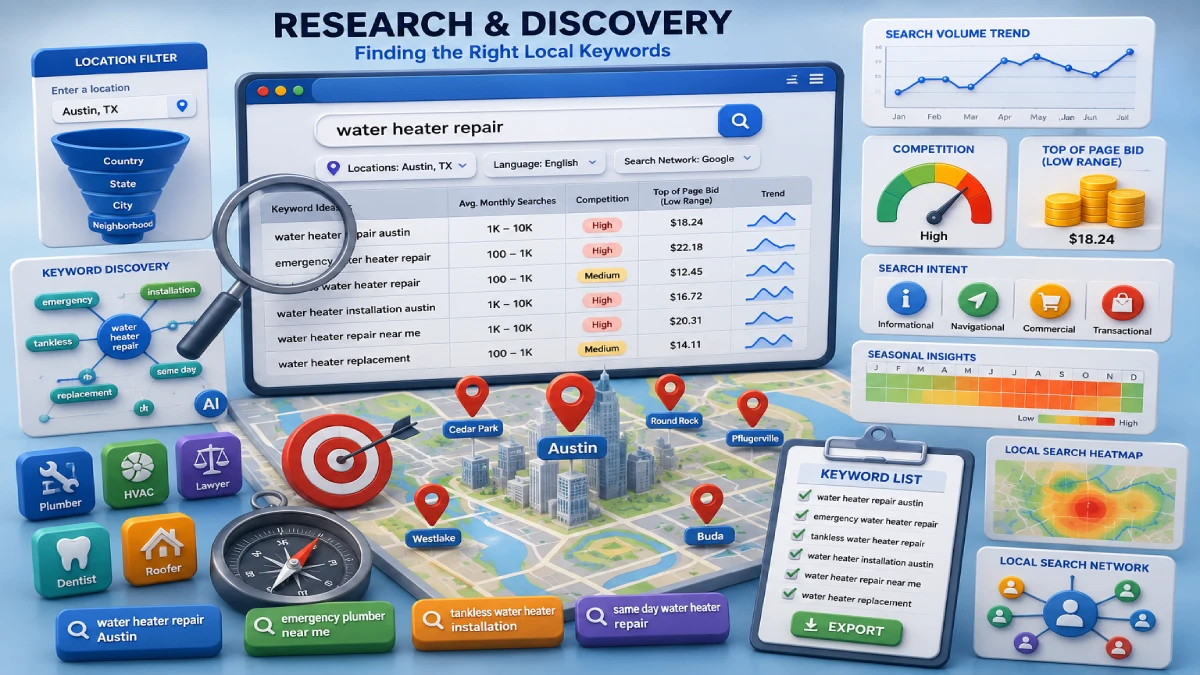
Location targeting is the most important step in using Google Keyword Planner for local SEO.
By default, the tool pulls national search volumes. A keyword like AC repair may show 50,000 monthly searches nationwide but only 110 in your city. Basing your strategy on national numbers means targeting demand that does not exist in your market.
To set your location, click the Locations field near the top of the results screen. Type your target city, county, or region. Click Target next to the correct result. ZIP code targeting is not supported in keyword research mode. Work around this by targeting the nearest city or county. Then add ZIP codes as on-page content modifiers like dentist in 78701.
For businesses serving multiple cities like a roofing company covering Denver, Aurora, and Lakewood, add all locations in one session. The tool combines search volumes across all selected areas. This gives you one unified dataset for your full service footprint.
How to Read Keyword Data for Local Markets
Google Keyword Planner shows four key data points: search volume ranges, competition level, top-of-page bid, and seasonal trends.
Free accounts show search volume as ranges like 100 to 1,000. Do not ignore keywords showing zero volume in small cities like suburbs or rural towns. These are often long-tail phrases like emergency commercial drain cleaning in Plano. They have almost no competition and high buying intent.
The competition column does not measure SEO difficulty. It measures how many advertisers bid on that keyword in Google Ads. Use high competition and high top-of-page bids as signals of commercial value. If advertisers pay $18 per click for emergency plumber Austin, that keyword drives real revenue. It is worth targeting organically.
How to Find City and Service Keyword Combinations
Combine your core service terms with city names, suburbs, neighborhoods, and landmarks to build a complete local keyword list.
Start with your primary service. Pair it with every location level you serve. An AC repair company in Austin would build combinations like AC repair Austin, AC repair Round Rock, and AC repair near downtown Austin. This grid approach captures how different customers search at different levels of specificity.
Go beyond basic service and city combinations to find keywords competitors miss. Add urgency terms like emergency and same-day. Use problem phrases like burst pipe repair and flat roof patch. Add audience terms like commercial drain cleaning and residential roofer. These modifiers capture high-intent searches that generic city pages never rank for.
For hyperlocal targeting, search for neighborhood and landmark combinations like plumber near Fenway Park or dentist downtown Austin. Google Keyword Planner may show zero volume for these terms. Target them anyway. Mobile searchers use these phrases when they need immediate local help. They convert at high rates.
How to Use Competitor URLs to Find Local Keyword Gaps
Google Keyword Planner lets you enter a competitor URL and see the keywords Google connects to their pages.
Search Google for your primary service in your target city like foundation repair Denver or emergency plumber Austin. Skip the paid ads. Find the top organic results. Copy one of those URLs. Open Google Keyword Planner. Click Discover New Keywords. Select the Start with a website tab. Paste the URL. Set your location filter. Click Get Results.
The tool shows keywords that Google associates with that page. Use this data three ways. Spot missing service verticals your site does not cover like basement crack injection or commercial sewer lining. Find location gaps where competitors target suburbs like Aurora or Englewood but you do not. Identify thin content where a competitor ranks for a term but their page is short and generic. That is your path to outrank them.
How to Combine Google Keyword Planner with Google Search Console
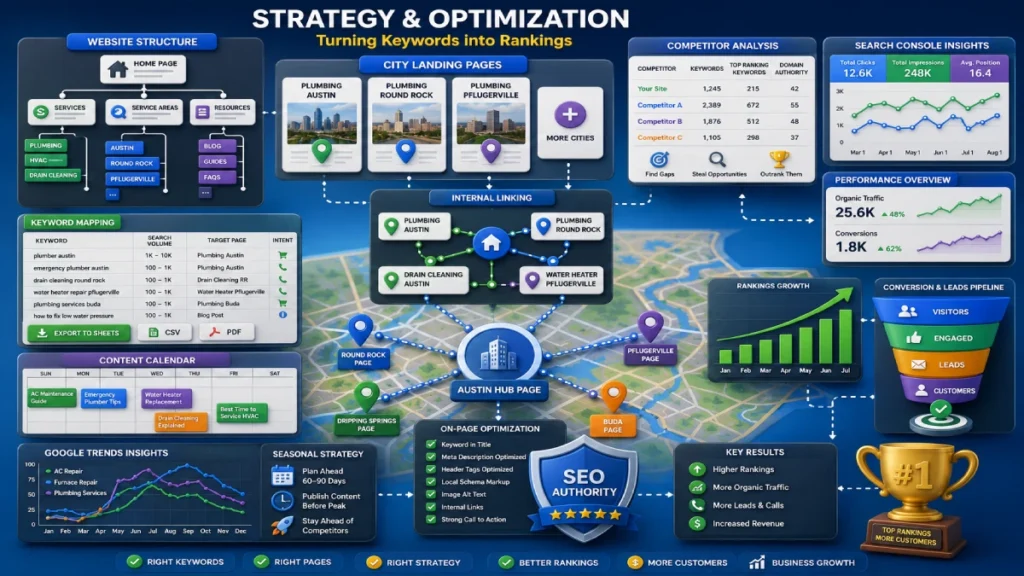
Google Keyword Planner shows keyword opportunities. Google Search Console shows how your site already performs. Use both together for a stronger local SEO strategy.
Search Console provides insights that Keyword Planner does not. It shows the exact queries your site ranks for, your average position, click-through rate, and total impressions. Open the Performance report.Adjust the date range to the last 90 days. Sort by impressions to find your best opportunities.
Look for sleeping giants. These are pages ranking in positions 11 to 30 with high impressions but almost zero clicks. Export those queries. Paste them into Google Keyword Planner’s Get Search Volume and Forecasts. If the planner shows strong local search volume and high advertiser competition, optimize those pages first. Moving a page from position 15 to position 3 is faster and cheaper than building a new page from scratch.
How to Map Keywords to City Service Pages
Keyword mapping means assigning each keyword to one specific page. This stops multiple pages from competing for the same term.
When pages compete for the same keyword, Google gets confused about which page to rank. This is called keyword cannibalization. It weakens both pages. A clean keyword map gives every page a clear, focused purpose.
Follow this simple framework for local service businesses:
- Homepage: Target your brand name combined with your primary city like “Johnson Plumbing Denver.”
- Core Service Pages: Target broad service terms without city modifiers like “water heater replacement” or “drain cleaning services.”
- City Service Pages: Target specific service and city combinations like “water heater repair Boulder” or “drain cleaning Aurora.” Only build a standalone city page if that keyword shows 50 or more monthly searches in the planner.
- Service Area Hub Page: Group suburbs and small towns with under 50 monthly searches onto one hub page instead of building thin individual pages for each location.
- Blog Posts: Target informational questions like “signs your water heater is failing” or “how to prevent frozen pipes.”
Prioritize keywords with transactional intent and high advertiser competition first. These drive calls and leads. Informational keywords build authority but convert at lower rates.
How to Export Your Keyword List and Build an Action Plan
Export your keyword list by selecting all target keywords inside the planner.Select the download icon at the top right of the screen. Save the file as a Google Sheets spreadsheet or CSV.
Pair this data with Google Trends to find seasonal demand patterns. Search interest for AC repair rises in April and peaks in JulySearch interest for furnace repair jumps in October and stays high through November. Publish or update your city service pages 60 to 90 days before each peak season. This gives Google time to index and rank them before demand arrives.
Common Mistakes to Avoid When Using Google Keyword Planner for Local SEO
Most local businesses make the same 5 mistakes with Google Keyword Planner. All of them are avoidable.
- Targeting keywords with no local intent. A local bakery targeting sourdough recipe attracts visitors from across the country. None of them will become customers. Filter by your service area and focus on transactional terms with clear local buying intent.
- Confusing ad competition with SEO difficulty. Low competition in the planner does not mean easy to rank for organically. High competition and high CPC bids like $15 to $25 signal strong commercial value. They are worth targeting organically.
- Ignoring low-volume keywords. Phrases with fewer than 50 monthly searches like emergency commercial roof repair Austin convert at high rates in local markets. Do not dismiss them.
- Skipping the location filter. Pulling national data gives you numbers that have nothing to do with your market. Always set your target city or region before analyzing any keyword.
- Building doorway pages. Creating pages that only swap the city name triggers Google penalties. Each city page needs at least 40% unique local content. Use the 50 monthly searches rule to decide which cities need their own page.
Google Keyword Planner vs Paid Tools: Which One Do You Need
For most small local businesses, Google Keyword Planner is enough.
It is free.It pulls keyword data straight from Google’s search database. It filters results by city, region, and service area. Pair it with Google Search Console and Google Trends. That gives a single-location business like a plumber, roofer, or dental clinic everything it needs.
Paid tools like Semrush, Ahrefs, and Ubersuggest cost $100 to $300 per month. They add exact search volumes, organic keyword difficulty scores, and automated competitor gap analysis. These features make sense for multi-location brands, marketing agencies, and businesses in competitive markets like New York, Los Angeles, and Chicago. Start free. Upgrade when your growth demands it.
FAQs
Do I need to run Google Ads to use Keyword Planner?
No, you only need a free Google Ads account. Google will not charge you if no campaigns are active.
Is Google Keyword Planner accurate for small local markets?
Yes, but free accounts show volume ranges instead of exact numbers. Target zero-volume keywords in small cities anyway as they carry high buying intent.
How do I get exact search volumes instead of ranges?
Run an active Google Ads campaign with real ad spend. Sufficient account activity unlocks exact monthly search figures.
Can I use Google Keyword Planner to target a specific ZIP code?
No, ZIP code targeting is not supported. Target the nearest city and add ZIP codes as on-page modifiers like plumber in 78701.
What happens if I skip the location filter?
The tool pulls national data by default. A keyword with 50,000 national searches may get only 90 in your city.
What happens if I build city pages for every keyword the planner shows?
Pages targeting cities with fewer than 50 monthly searches risk doorway page penalties. Group low-volume suburbs onto one service area hub page instead.
Will Google Keyword Planner still be useful as AI search grows?
Yes, it pulls first-party data from Google’s own search index. That data stays relevant for both traditional and AI-driven search results.
How often should I run local keyword research?
Every 3 to 6 months. Update your list 60 to 90 days before peak seasons using Google Trends alongside the planner.
Conclusion
Google Keyword Planner covers everything a local business needs to find the right keywords, and it costs nothing. Set your location filter. Focus on transactional keywords. Use the 50 monthly searches rule to decide which city pages to build.Use Google Search Console to track performance and Google Trends to time your content before peak seasons arrive.
The businesses ranking in every city they serve are not using expensive tools. They use the same free tool with the right settings and a clear page strategy behind every keyword they target.
Ready to start ranking in your city? Open Google Keyword Planner, set your location filter, and build your first city and service keyword list today.

30 June 2026
How to Set Up Your Google Business Profile...

30 June 2026