
82% of top-ranking local businesses include both a keyword and a city in their title tag. Most of their competitors do not. That one difference decides who gets found and who gets ignored.
Your website might have great services, fair prices, and happy customers. But if your title tags are generic, too long, or missing your location, Google simply passes your page over. Every day without optimized title tags is another day your competitors are taking those clicks instead of you.
This guide shows you the exact formula local businesses use to write title tags that rank. You will see real examples across business types like plumbers, dentists, lawyers, and restaurants. You will also learn how to fix common mistakes, handle multiple locations, and stop Google from rewriting your tags.
What Is a Title Tag?
A title tag is an HTML element that sets the official title of a webpage. It appears as the clickable blue headline in Google search results, in your browser tab, and in social media previews. It lives inside the <head> section of your page’s code and is never visible on the page itself.
html
<title>Emergency Plumber in Austin, TX | 24/7 Service | ATX Plumbing</title>
For local businesses, Google reads this element first when deciding whether your page matches a local search query.
Title Tag vs. Meta Description vs. H1: What Is the Difference?
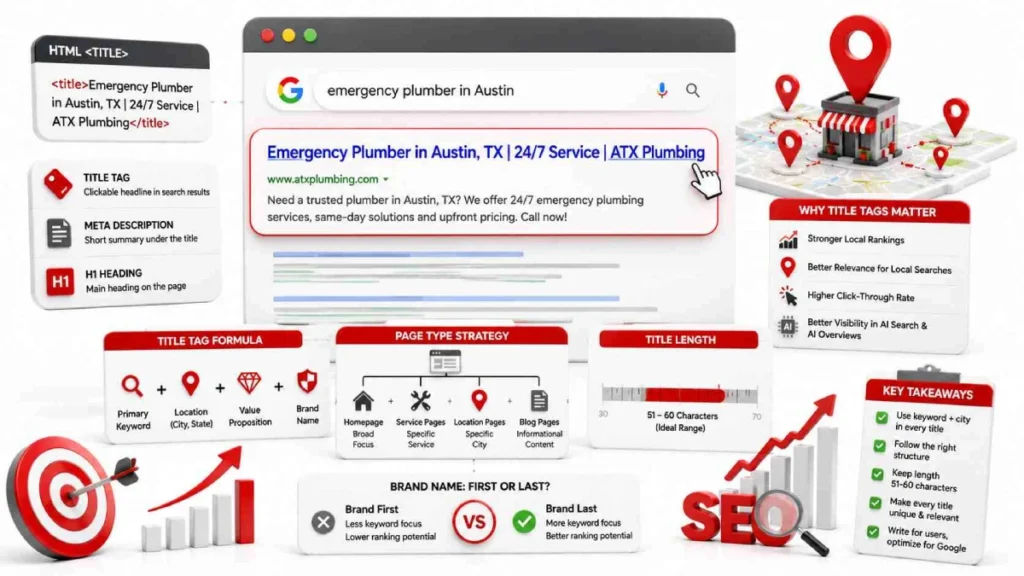
The title tag is the clickable headline in Google results. It is one of the strongest direct ranking signals on your page. The meta description is the short text below it in search results. It does not affect rankings directly but influences how many people click. The H1 tag is the main heading visitors see at the top of your webpage after they click through.
When your title tag and H1 cover the same topic, Google retains your original title 97.3% of the time. When they conflict, Google rewrites your title with its own version.
Why Title Tags Matter for Local SEO
Title tags are one of the strongest on-page signals Google uses to rank local businesses. When someone searches for a service in their city, Google reads the title tag first. A study of 100 top-ranking local businesses showed that 93% had their target keyword in the title tag. 82% included both the keyword and their city.
Title tags also decide how many people click your result. One study found that adding specific neighborhood names to title tags increased daily clicks by 59.65%. Average rankings improved from position 18 to position 15. A good title tag helps Google understand your page and gives searchers a reason to click.
Do Title Tags Affect Google Maps Rankings or Just Organic?
Title tags do not directly affect your Google Maps or Local Pack ranking. The Maps algorithm looks at your Google Business Profile, your distance from the searcher, and how well known your business is online. Your GBP category, business name, and reviews carry far more weight in the Local Pack.
But title tags hold two spots in the top 15 local organic ranking factors. The title tag of the page connected to your Google Business Profile is the 4th most important organic factor. Optimized title tags across your whole website rank 11th. Better organic rankings build your site authority. That authority improves your Maps visibility over time.
The Local SEO Title Tag Formula
The best local SEO title tag follows this order: Primary Keyword + Location + Value Proposition + Brand Name.
Google tends to prioritize keywords that appear earlier in the title tag. Put your service and city first. This ensures Google reads the most important information before anything gets cut off. Here is how this formula looks for real businesses:
- Emergency Plumber in Dallas, TX | Same-Day Service | ATX Plumbing
- Family Dentist in Chicago, IL | Free New Patient Exam | Lakeview Dental
- DUI Defense Attorney in San Diego | Free Consultation | Smith & Jones Law
How Long Should a Title Tag Be?
Keep your title tag between 51 and 60 characters. Google rewrites titles under 30 characters because they often lack sufficient context. Titles over 70 characters face a 99.9% rewrite rate. The 51 to 60 character range has the lowest rewrite rate of only 39 to 42%, so aim for around 59 characters to use as much space as possible without going over.
Should Your Brand Name Go First or Last?
Put your brand name last on almost every page.Google places more ranking emphasis on words at the beginning of a title tag. Most local searchers type things like “roof repair near me” or “family lawyer in Houston.” They search by service and city, not by brand name. The only exception is your homepage, where a well known local brand can lead with its name. For newer businesses, the homepage still performs better with the service keyword first.
How to Write Title Tags for Each Page Type
Each page on your website needs its own unique title tag. Using the same structure on every page confuses Google and weakens your rankings. A homepage targets broad searches. A service page targets one specific job. A location page targets a specific city. Each one needs a different approach.
Homepage
Formula: Core Service in Primary City, State | Brand Name
Your homepage targets your most important keyword and your primary location. It represents your whole business so keep it broad but specific enough to signal what you do and where. For example: Plumber in Austin, TX | ATX Plumbing
Service Page
Formula: Specific Service in City, State | USP | Brand Name
Service pages target one single offering like tankless water heater repair, DUI defense, or teeth whitening. Lead with the specific service and add a value proposition to give searchers a reason to click. For example: Tankless Water Heater Repair in Austin, TX | Same-Day Service | ATX Plumbing
City or Location Landing Page
Formula: Core Service in Target City or Neighborhood | Local USP | Brand Name
Location pages target cities or neighborhoods outside your main address. Use specific area names like Williamsburg Brooklyn or North End Boston. Avoid broad terms like New York or Boston. This captures low competition local searches and keeps each page title unique.
Roof Repair in Williamsburg, Brooklyn | Free Estimates | Brand
Blog or Resource Page
Formula: Informational Keyword or Question + Actionable Promise | Brand Name
Blog pages target readers who want to learn rather than buy immediately. Skip the city name and focus on the question or topic instead. Add a clear benefit or promise to make the title worth clicking. For example:5 Signs You Need a New Roof Before Winter | Brand Name
How to Make Your Title Tag Get More Clicks
To get more clicks, add words that create urgency, build trust, and give searchers a reason to choose you. Local searchers want fast and reliable help. Words like “Same-Day,” “24/7,” “Emergency,” and “Free Quotes” speak directly to that need. They make your result stand out from the rest of the page.
Google tends to prioritize keywords that appear early in a title tag.They reduce doubt before someone even clicks your link. Small word swaps make a difference too. Changing “Tips” to “Secrets,” “Guide” to “Blueprint,” or “Help” to “Fast Fix” makes your title feel more useful and worth clicking.
One thing most people overlook is punctuation. Brackets trigger a 77.6% rewrite rate. Google deletes bracketed text completely 32.9% of the time. Dashes have only a 19.7% rewrite rate and are the safest option. Keep your title clean and avoid ALL CAPS. Excessive punctuation makes your listing look spammy and reduces clicks.
Title Tags for Multi-Location and Service Area Businesses
If your business serves multiple cities, every location needs its own dedicated page with a unique title tag. Using one general page for all locations is a common mistake that weakens your rankings. Google needs a separate page for each city you serve to rank you in multiple locations at the same time.
How to Avoid Duplicate Title Tags Across Location Pages
The biggest mistake is swapping only the city name while keeping everything else identical. Instead use specific neighborhood names like “Plumber in Uptown Dallas.” Rotate value propositions too. Use “Voted Best in Austin” on one page and “Serving Travis County Since 1995” on another. Each location page also needs at least 500 to 800 words of unique content.
What to Do If Your Business Has No Fixed Address
Service area businesses like mobile locksmiths, landscapers, and residential cleaners need a dedicated landing page for each city they serve. Write a unique title tag for each one.
Mobile Locksmith Services in Arlington, TX | Fast Response | Brand
Add a Google Maps embed showing your service boundaries. Make sure the cities on your page match exactly what you have listed inside your Google Business Profile. This helps Google verify where you operate and show your pages in local results.
Common Title Tag Mistakes Local Businesses Make
Most local businesses lose rankings because of the same repeating title tag mistakes. These are the most common mistakes to avoid.
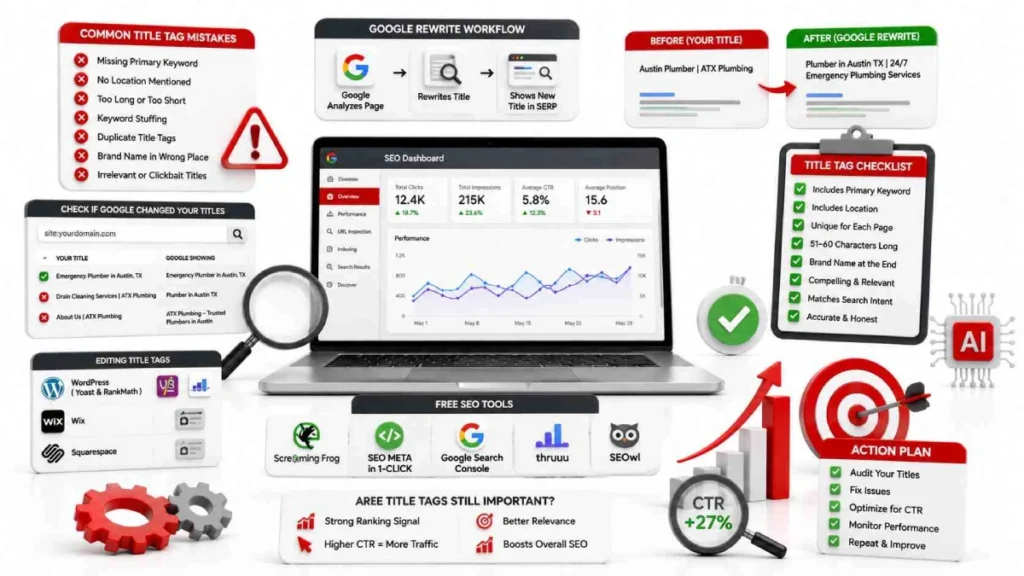
- Keyword stuffing: Repeating the same keyword multiple times like Plumber Denver | Denver Plumbing | Best Plumbers Denver triggers Google spam filters and forces a rewrite.
- Generic default titles: Leaving titles as “Home,” “Services,” or “Page 2” gives Google no information about your business or location.
- Duplicate title tags: When your Dallas, Austin, and Houston pages share nearly identical titles, Google cannot decide which page to rank for which city.
- Wrong title length: Google rewrites titles under 30 characters 96.6% of the time. Titles over 70 characters face a 99.9% rewrite rate.
- Broken promises: If your title says “Free Estimates” or “Same-Day Service” but your page never mentions either, visitors leave immediately and your bounce rate rises.
- Missing location: Leaving out your city name removes the most important local relevance signal from your title tag entirely.
- Same title tag on every page: Using one title tag across your whole website confuses Google and dilutes your rankings across all pages at once.
Why Google Rewrites Your Title Tags and How to Prevent It
Google rewrites title tags approximately 60 to 63% of the time across all organic search results. This has been common since Google’s August 2021 title update. Google rewrites titles it considers too long, too short, spammy, or mismatched with the actual page content.
The most common triggers that cause Google to rewrite your title are:
- Title too short: Google rewrites titles under 30 characters 96.6% of the time.
- Title too long: Titles over 70 characters face a 99.9% rewrite rate.
- Keyword stuffing: Repeating the same phrase multiple times triggers spam filters automatically.
- Wrong punctuation: Brackets trigger a 77.6% rewrite rate. Dashes have only a 19.7% rewrite rate.
- Title and H1 mismatch: When your title tag and H1 heading conflict, Google replaces your title with its own version.
- Outdated information: Titles showing old dates like “2020” on a page updated to 2026 get rewritten automatically.
- Language mismatch: If your title is in English but your page content is in another language like Urdu or Hindi, Google rewrites the title to match the page.
The single most effective way to prevent rewrites is to align your title tag with your H1 heading. Research shows that when both elements cover the same topic with consistent terms, Google keeps your original title 97.3% of the time.
How to Check If Google Is Changing Your Tags
Use these three methods to find out if Google is rewriting your title tags.
The quickest way is the Google site search command. Type site:yourpage.com/your-page-url directly into Google search with no space after the colon. Google will show you exactly how your title tag appears in live search results right now.
For a faster one-click check, install the free Chrome extension SEO META in 1-CLICK. Open any page on your site and click the extension. Place your title tag and H1 tag side by side to verify they support the same topic.
For a full site audit, use Screaming Frog to crawl all your pages and export every title tag at once. Pair this with Google Search Console to check CTR data. If a rewritten title is getting fewer clicks than your original, rewrite your H1 to match your preferred title tag and signal to Google to restore it.
How to Edit Your Title Tags
You can edit your title tag directly inside your CMS without touching any code. Most website platforms have a built-in SEO field where you type your title tag and save it. The exact location depends on which platform your website runs on.
WordPress: Yoast SEO and RankMath
WordPress does not have a native title tag field so you need an SEO plugin like Yoast SEO or RankMath.
Using Yoast SEO:
- Open the page or post in your WordPress dashboard
- Scroll to the Yoast SEO section below the content editor
- Click the SEO tab and find the SEO Title field
- Type your optimized title tag and click Update to save
Using RankMath:
- Open the page or post in the WordPress editor
- Click the Rank Math icon in the upper-right corner.
- Click Edit Snippet to open the title field
- Type your optimized title and save the page
RankMath also has a Bulk Editor that lets you update title tags across dozens of pages from one screen which saves a lot of time for multi-location sites.
Wix and Squarespace
Both Wix and Squarespace have built-in SEO settings that let you edit title tags without any plugins.
Using Wix:
- Open your Wix Editor and go to Pages and Menu
- Click the three dots next to the page you want to edit
- Select SEO Settings from the dropdown
- Enter your title tag in the Title Tag field and publish
Using Squarespace:
- Open the Pages panel and click the settings icon next to your page
- Click the SEO tab in the page settings box
- Enter your title in the SEO Title field and click Save
- Keep your title under 60 characters as Squarespace allows up to 100 characters in the field but Google will cut off anything beyond 60
One important note for Squarespace users: never use angle brackets like <> in your title tag field. Squarespace renders them as active HTML code which can make parts of your title invisible in search results.
Free Tools to Write, Preview, and Audit Your Title Tags
You do not need expensive software to manage your title tags. These free tools cover everything from writing and previewing to auditing and tracking rewrites.
- SEO META in 1-CLICK is a free Chrome extension that shows your title tag, meta description, and H1 tag on any live webpage with a single click. It offers the quickest way to verify your title tag without checking code.
- Screaming Frog SEO Spider crawls your entire website and exports every title tag at once. The free version handles up to 500 URLs and flags titles that are missing, duplicated, too long, or too short. It is the best tool for a full site audit.
- SEOwl Title Rewrite Checker shows you exactly which words Google has dropped or added when rewriting your title tags. It compares your set title against what Google actually shows in live search results.
- thruuu SERP Analyzer lets you analyze the title tags of every page ranking for any local keyword. Use it to see what your competitors are doing and spot patterns in top ranking titles.
- Google Search Console is not a title tag writer but it is the most important tool for tracking performance. Check the CTR of pages where Google has rewritten your title. If clicks dropped after a rewrite, that is your signal to fix the H1 and title tag alignment on that page.
Are Title Tags Still Important for Local SEO in 2025?
Yes, title tags are still one of the most important on-page signals for local SEO in 2025. Google AI Overviews and rewriting algorithms have made some people question this. But the data says they still matter. Without an optimized title tag Google has no way to understand your page. It also cannot determine your business location.
AI Overviews follow the same title tag rules as standard search results. They respect similar character limits and truncate titles that are too long. They also rewrite titles that do not match page content. A well-optimized title tag gives Google a clean signal in both standard results and AI-generated answers.
Title tags also directly influence your organic rankings which feed into your Google Maps visibility. Google uses your organic site authority as a prominence signal when calculating Local Pack rankings. Letting your title tags go unoptimized weakens both your organic results and your Maps presence at the same time.
Local SEO Title Tag Checklist
Run every title tag through this checklist before publishing or updating any page on your site.
- Put your keyword first: Place your main service keyword within the first 30 characters of the title tag.
- Add your location: Include a specific city, neighborhood, or county name to establish local relevance.
- Hit the right length: Keep your title between 51 and 60 characters to stay in the lowest rewrite range.
- Use dashes as separators: Dashes have only a 19.7% rewrite rate. Avoid brackets which trigger a 77.6% rewrite rate.
- Align your title tag with your H1: When both match semantically Google retains your original title 97.3% of the time.
- Add a value proposition: Include a local modifier like “Same-Day,” “24/7,” or “Free Quote” to improve clicks.
- Put your brand name last: Keep your brand name at the end on all pages except a well-known brand homepage.
- Make every title unique: No two pages on your site should share the same or nearly identical title tag.
- Match your page content: Never promise something in your title like “Free Estimates” that your page does not actually mention.
- Check your language: Write your title tag in the same language and script used on the rest of the page.
- Verify crawl permissions: Never block a page that has a noindex rule. Google must crawl it to apply the directive.
- Audit regularly: Use Google Search Console and Screaming Frog to check for rewrites, duplicates, and missing tags.
FAQs
What is a title tag in local SEO?
A title tag is an HTML element that appears as the clickable headline in search results. It helps Google understand your services and target location.
Should my brand name go first or last?
Put your brand name last on almost every page. Most local searchers search by service and city so leading with your keyword captures more traffic.
Why does Google rewrite my title tags?
Google rewrites titles that are too long, too short, keyword stuffed, or mismatched with page content. Aligning your title tag with your H1 heading retains your original title 97.3% of the time.
What happens if I use the same title tag on every page?
Using the same title tag across multiple pages causes keyword cannibalization. Google cannot decide which page to rank for which query and all affected pages lose ranking power..
Are title tags still important in 2025?
Yes, title tags are still a strong on-page signal for local SEO in 2025.. Google AI Overviews follow the same title tag rules as standard search results.
How do service area businesses handle title tags?
Build a dedicated landing page for each city you serve with a unique title tag targeting that location. Align those cities with the service areas set inside your Google Business Profile.
Conclusion:
Title tags are one of the simplest changes you can make to improve your local search rankings. Lead with your service and city, add a value proposition, and keep it between 51 and 60 characters. Put your brand name at the end and do this for every page on your site.
Google rewrites title tags 60 to 63% of the time but most of those rewrites are preventable. Align your title tag with your H1 heading, avoid keyword stuffing, and write a unique tag for every page. Follow the checklist in this guide and you give Google every reason to keep your original title intact.
Ready to fix your title tags? Begin with your five most important pages. Check each one against the checklist in this guide and update any title that is missing a keyword, missing a location, or too generic. Those five changes alone can make a real difference in how Google ranks your business in local search results.
.


14 July 2026