A large number of people regularly use Google to find local businesses. Most never find yours. Your city name is on your pages. Your Google Business Profile is claimed. But your phone is still quiet. That happens when your pages are missing the specific signals Google needs. Title tags without location data, inconsistent NAP, missing schema, and weak location pages all tell Google nothing useful about where you operate.
This guide fixes that. You will learn how to optimize every core on-page element, build location pages that rank, add schema markup without any coding, and measure your progress with free tools.
What Is Local On-Page SEO?
Local on-page SEO is the process of optimizing your website pages so Google can connect your business to local searches. It covers everything Google and visitors see on your page. This includes title tags, headings, body content, images, and structured data.
When someone searches “emergency plumber in Austin,” Google reads each page. It looks for businesses that serve that area. Local on-page SEO puts geographic information on your pages. It does this in a way Google can read and trust.
Why It Matters for Small Businesses in 2025
87% of consumers use Google to find local businesses. 80% search every week. 32% do it every single day. Local searchers are ready to act. Someone searching “emergency HVAC repair in Phoenix” wants to call now. Someone searching “walk-in clinic open now in Dallas” needs help today.
In 2025, AI-powered search tools such as ChatGPT Search and Perplexity can surface local businesses directly within their responses. They pull from structured local service pages. Without strong on-page signals, your business gets skipped.
How Google Ranks Local Search Results
Google ranks local results using three factors: relevance, proximity, and prominence. Relevance measures how well your page matches the search query. Proximity is the distance between the searcher and your business. Prominence measures how trusted your business is. It is based on reviews, backlinks, and owner responses.
These three factors work together. A plumbing company in Dallas with a “Water Heater Repair in Dallas TX” page and 150 Google reviews will outrank a competitor with a generic homepage.
Local Pack vs. Organic Local Results
Google displays local results in two formats. The Local Pack shows 3 business listings with a map at the top of the page. It captures a large share of clicks for local queries. Below it sit the organic local results. These are standard web page listings ranked by content quality and relevance.
On-page SEO affects both. Your Google Business Profile gets you into the Local Pack. Your website content gets you organic results. Google uses your page content, NAP details, and schema markup to confirm your Business Profile. A strong profile with a weak website limits your visibility.
Core On-Page Elements Every Local Page Needs
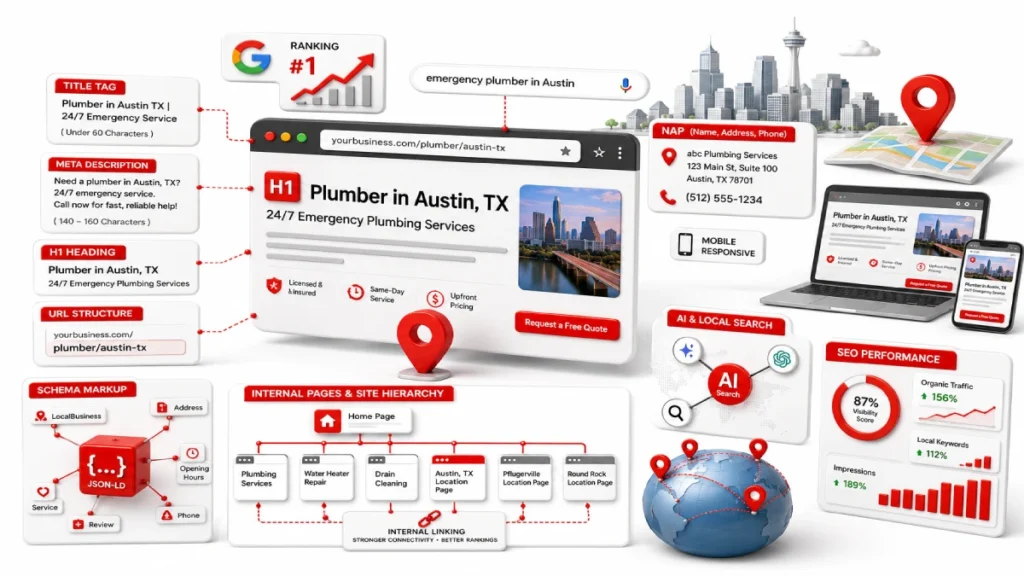
Every local page needs 5 core elements: a location-signal title tag, a meta description, a single H1 heading, a clean URL, and visible NAP information. These are the first things Google reads when it crawls your page. Getting them right tells Google what service you offer and where you offer it.
Title Tag with Location Signal
Your title tag is the most important on-page ranking signal for local SEO. Keep it under 60 characters. Front-load your primary keyword. Include your city and state. A roofing company in Denver would use “Roof Repair Denver CO | Free Inspections” not “Welcome to Our Website.”
Meta Description
The meta description does not affect rankings directly. But it affects clicks.Aim for a length of 140–160 characters. Include your location, service, and a call to action. For example: “Need an electrician in Tampa FL? Same-day service. Call now for a free estimate.”
H1 Heading
Every local page needs one H1 heading. It must include the primary keyword and the target city. Do not use your business name as the H1. A dental clinic in Austin should use “Family Dentist in Austin TX” not “Welcome to Bright Smiles Dental.”
URL Structure
Keep URLs short and location-specific. Use a format like domain.com/plumber/denver or domain.com/locations/austin. Avoid dynamic URLs like domain.com/?p=1234. Clean URLs help Google and visitors understand the page before clicking.
NAP Placement on the Page
NAP stands for Name, Address, and Phone number. It must appear as readable HTML text on the page. Never place it inside an image. Search engine bots cannot read text inside JPEGs or PNGs. If your address only exists inside a graphic, Google cannot verify your location.
How to Write a Title Tag for a Local Business Page
Use this formula: Primary Keyword + City, State | Value Proposition | Brand Name. Use a vertical pipe ( | ) instead of a dash to save character space. Never put multiple cities into one title tag. One page targets one location.
Business Type Example Title Tag Service-based Plumber in Austin TX | 24/7 Emergency Service Retail or Dining Italian Restaurant Downtown Chicago | Fresh Pasta Daily Professional Family Lawyer Houston TX | Free Consultation
| Business Type | Example Title Tag |
| Service-based | Plumber in Austin TX | 24/7 Emergency Service |
| Retail or Dining | Italian Restaurant Downtown Chicago | Fresh Pasta Daily |
| Professional | Family Lawyer Houston TX | Free Consultation |
Where to Place Your NAP for Maximum Consistency
Your NAP must appear in 3 places: the site-wide footer, the contact page, and inside your LocalBusiness schema markup. Format it the same in all 3 places. If your Google Business Profile lists “Suite 4B,” your website must also say “Suite 4B.” Not “Ste 4B” or “#4B.” One difference across Yelp, Facebook, or your footer can weaken your local rankings.
How to Write Local Content That Ranks
Local content ranks when it answers what local customers search for and includes geographic signals Google can verify. Every local page needs service details and local references. Mention neighborhoods like Capitol Hill in Seattle or Buckhead in Atlanta. Add customer reviews that name local areas. Staff credentials, local licenses, and real project photos strengthen E-E-A-T signals on the page.
Use your primary keyword in the title tag, H1, and once or twice in the body. Then switch to natural variations. Instead of repeating “plumber in Austin TX,” write “our Austin team” or “we serve the greater Austin area.” Mention details only a local business would know.
For example, Cook County permit rules for a Chicago contractor. Or drought-resistant plants for a Phoenix landscaper. Repeating location phrases triggers over-optimization penalties.
Local Landing Pages vs. Service Area Pages
A local landing page is for businesses with a physical location. A service area page is for businesses that travel to the customer. A dental clinic in Boston, a retail store in Nashville, or a law office in San Diego needs a local landing page. A plumber, roofer, or home cleaning service needs service area pages. They serve multiple cities from one base. Using the wrong page type sends mixed signals to Google.
How to Build a Location Page That Actually Ranks
A location page ranks when it has unique, location-specific content. It cannot be copy-pasted from another city page. A gym targeting both Denver and Phoenix should not use the same template. The Denver page can mention Rocky Mountain trail running. The Phoenix page highlights heat-safe, climate-controlled training. Each page needs a clear H1 with the target city, plain HTML NAP text, an embedded Google Map, and real customer reviews from that area.
Local Keyword Research for On-Page SEO
Local keyword research means finding the phrases local customers type into Google when they are ready to buy or call.
Add location modifiers to your keywords, such as “roof repair in Charlotte NC,” “emergency dentist Austin TX,” or “dog groomer near downtown Portland.” Assign each keyword to a single dedicated page.
Your homepage targets your primary service keyword. Service pages like “AC Repair” or “Roof Installation” target specific offerings. Location pages target geographic variations. This stops keyword cannibalization. That is when two pages compete for the same term and weaken each other.
46% of all Google searches include a “near me” phrase. But repeating “near me” in your copy does not help. Google calculates near me results from your verified address, GBP completeness, and on-page authority. Use Google Keyword Planner for city-level volume, AnswerThePublic for local questions, and Google Search Console for queries your site already ranks for.
Schema Markup for Local Businesses
Schema markup is code added to your website. It helps Google understand your business in a structured format. Without it, Google guesses what your business does and where it operates. With schema, you tell Google your name, address, phone number, hours, and services. Use the most specific type on Schema.org. A restaurant uses FoodEstablishment. A law firm uses LegalService. A dental clinic uses Dentist, not a generic Organization schema.
For local businesses, LocalBusiness schema and Service schema should be nested in one JSON-LD block. LocalBusiness covers your address, coordinates, and hours. Service schema covers offerings like “roof repair,” “teeth whitening,” or “tax preparation.” Use Merkle’s Schema Markup Generator or Rankley to build the code. Use Google’s Rich Results Test to review your page before publishing.
Keep the schema consistent with your page content. If your schemahttps://usamahabib.com/meta-descriptions-local-seo lists hours not shown on the page, Google can apply a penalty. Place your main LocalBusiness schema on the homepage. Give each location page its own schema with a unique address.
How Your Website and Google Business Profile Work Together
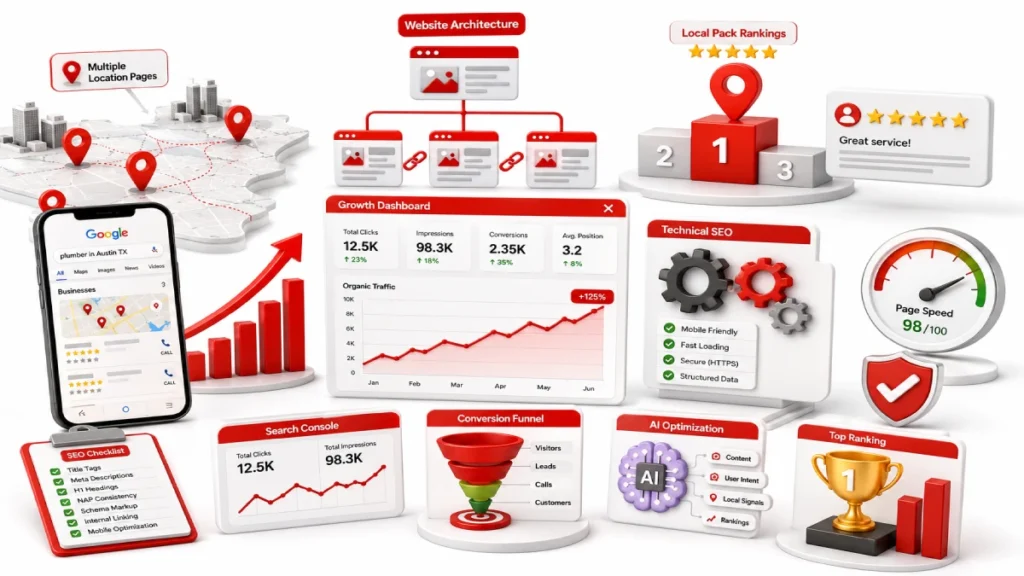
Your Google Business Profile and your website are 2 separate assets.Together, they strengthen your visibility in local search results. Your GBP powers the Local Pack. Your website gives Google the content it needs to verify your business details. Business name, address, phone number, and hours must match across both. Any mismatch hurts rankings.
Google cross-references local citations on Yelp, Apple Maps, and Bing Places. It also checks 3 major data aggregators: Data Axle, Foursquare, and Localeze. After Google’s August 2024 Diversity Update, link your GBP to an inner location page, not your homepage. This keeps your homepage ranking organically while the inner page powers the Local Pack.
Technical On-Page Factors That Affect Local Rankings
3 technical factors affect local search rankings: mobile optimization, page speed, and image optimization.
Use a responsive, mobile-first design. Add click-to-call buttons and simple forms. Keep key information visible without scrolling. If visitors have to zoom or hunt for your phone number, they leave. Google tracks that and it hurts your rankings.
Page speed is just as important. If your page takes more than 3 seconds to load, bounce rates go up. Compress images, remove unused code, and use a fast hosting provider. These 3 fixes can cut load time in half for most small business websites.
Internal Linking Between Your Service and Location Pages
Internal linking spreads page authority across your website. It helps Google find and index all your local pages. Your homepage links to core service pages like “Plumbing Services” or “Roof Installation.” It also links to primary location pages. Each location page links back to the most relevant service pages. Every page needs at least 2 inbound internal links. Pages with no incoming links get overlooked by Google crawlers.
For images, use descriptive file names and alt text. Use “water-heater-repair-austin-tx.jpg” not “img001.jpg.” Write alt text like “licensed plumber repairing water heater in Austin TX.”
Common Local On-Page SEO Mistakes to Avoid
The most common local on-page SEO mistakes are city keyword stuffing, duplicate location pages, inconsistent NAP, missing schema, poor mobile experience, and orphaned pages. Most come from shortcuts. Each one signals low quality to Google. They filter your pages out of results or trigger a penalty.
Mistakes and fixes:
- City keyword stuffing: Use the target city once or twice. Then switch to “our Austin team” or “we serve the greater Denver area”
- Copy-pasted location pages: Write unique content for each city. Reference local landmarks and area-specific services
- Inconsistent NAP: Match your name, address, and phone exactly across your website, GBP, Yelp, and Facebook
- Missing schema: Nest LocalBusiness and Service schema in one JSON-LD block. Validate with Google’s Rich Results Test
- Poor mobile experience: Use a responsive design with click-to-call buttons and load times under 3 seconds
- Orphaned location pages: Give every location and service page at least 2 inbound internal links
Local On-Page SEO Checklist for 2025
Use this checklist to optimize your local pages and maintain long-term visibility.
Beginner Actions
- Add target city and service to every title tag under 60 characters
- Write a unique meta description under 160 characters for every local page
- Place one H1 on each page with the primary keyword and target city
- Add NAP as plain HTML text in the site-wide footer
- Match website NAP exactly to your Google Business Profile
- Claim and optimize listings on Yelp, Apple Maps, and Bing Places
Intermediate Actions
- Nest LocalBusiness and Service schema in one JSON-LD block and validate with Google’s Rich Results Test
- Create a dedicated location page for each target city
- Link your Google Business Profile to a dedicated inner location page, not your homepage
- Use a mobile-first design with load times under 3 seconds
- Connect all location and service pages with at least 2 inbound internal links per page
Ongoing Maintenance
- Run quarterly NAP audits across Yelp, Facebook, and Apple Maps
- Add 3 to 5 new geotagged photos to your Google Business Profile weekly
- Reply to all customer reviews using natural, location-specific language
- Check for orphaned pages quarterly and add internal links where missing
- Update seasonal hours and holiday schedules on your website and GBP
How to Know If Your Local On-Page SEO Is Working
Track four key metrics to measure local on-page SEO performance: organic visibility, local conversions, Google Business Profile engagement, and geo-grid rankings.
Use Google Search Console to track impressions, click-through rates, and rankings for queries like “plumber in Denver CO” or “dentist Austin TX.” In Google Analytics 4, filter traffic by city. Track phone number clicks and form submissions from local pages.
Results come in stages. Google indexes updated NAP and schema within 0 to 4 weeks. Local Pack positions improve within 1 to 3 months. Location pages rank for city-level queries between 3 and 6 months. Sustainable traffic growth begins after 6 months. Markets like New York, Los Angeles, and Chicago take longer than smaller cities.
FAQs
What is local on-page SEO?
Local on-page SEO is the process of optimizing your website pages so Google can connect your business to searches in your area. It covers title tags, NAP placement, schema markup, location-specific content, and internal linking.
How long does local on-page SEO take to show results?
Google indexes updated NAP and schema within 0 to 4 weeks. Local Pack positions improve within 1 to 3 months. Sustainable organic growth begins after 6 months.
What happens if my NAP is inconsistent across directories?
Inconsistent NAP weakens your local ranking authority. Run quarterly audits across Yelp, Apple Maps, and Bing Places to keep all listings identical.
Do I need a separate page for every city I serve?
Yes, Copy-pasting the same page with only the city name swapped creates duplicate content. Google filters it out of search results.
What is schema markup, and is it necessary for my website?
Schema markup gives Google machine-readable details about your business. Nesting LocalBusiness and Service schema in one JSON-LD block strengthens Local Pack and organic local rankings.
What happens if I link my Google Business Profile to my homepage?
After Google’s August 2024 Diversity Update, this can demote your homepage’s organic ranking. Link your GBP to a dedicated inner location page instead.
What free tools can I use for local on-page SEO?
Google Search Console tracks local rankings. Google Analytics 4 tracks conversions by city. BrightLocal’s free checker shows your rankings from any zip code.
Will AI search tools replace Google for local searches?
No. AI tools like ChatGPT Search and Perplexity expand local search. Businesses with strong local on-page SEO benefit across both platforms.
What is keyword cannibalization in local SEO?
Keyword cannibalization happens when 2 pages target the same keyword and compete against each other. Assign one primary keyword to one page only and monitor with Google Search Console.
Conclusion
Local on-page SEO is the foundation every small business needs. Your title tags, NAP consistency, schema markup, and location-specific content tell Google who you are, where you operate, and who you serve.
Start with one page. Apply every element from the checklist. Validate your schema and build from there. After Google’s August 2024 Diversity Update, linking your GBP to an inner location page is a direct ranking decision, not an optional step.
The businesses that show up in local search are not always the biggest ones. They are the ones with the most accurate and locally relevant pages. Audit your most important local page today, fix what is missing, and use the checklist in this guide to track your progress.

30 June 2026
How to Use Google Keyword Planner for Local...

30 June 2026