
H1 tags for local SEO are one of the strongest on-page signals that tell Google what service you offer and which city you serve. Your H1 tag is the most important heading on your webpage.
This guide covers everything a local business owner needs to know about H1 tags. You will learn what an H1 tag is, why it matters for local search, how to write strong H1s for different page types like homepages, city landing pages, and service pages, and how to audit and fix heading issues on WordPress, Wix, Squarespace, and Shopify.
Key Points:
- Your H1 tag tells Google what service you offer and which city you serve.
- Every page needs exactly one H1 tag with your primary service and target location.
- H2 and H3 tags expand your local keyword coverage beyond what your H1 can cover alone.
- Multi-location businesses need a unique H1 on every city page to avoid duplicate content issues.
- A missing, vague, or duplicate H1 directly hurts your local search rankings.
- A clean heading structure increases your chances of appearing in Google AI Overviews and voice search results.
What Is an H1 Tag?
An H1 tag is the main heading of a webpage that tells Google and visitors what the page is about. In HTML, it looks like this: <h1>Emergency Plumbing in Austin, TX</h1>. Every page on your website should have exactly one.
It is the first thing search engines read when crawling your page. It is also the first heading your visitors see after clicking your link. Think of it as the title on the cover of a book. It sets the topic for everything that follows.
How H1 Tags Fit Into the HTML Heading Hierarchy (H1–H6)
HTML has 6 heading levels. H1 is the most important one.The H1 introduces the page’s primary topic, H2s organize the main sections, and H3s break those sections into more specific details. Never skip levels. Jumping from H1 to H3 confuses both Google and screen readers.
H1 Tag vs. Title Tag: What Is the Difference?
The title tag appears in Google search results. The H1 tag appears on your page.Your title tag plays a key role in earning clicks from searchers. Your H1 confirms to the visitor they landed in the right place.
For example: Your title tag might read “Emergency Plumbers in Bristol | 24/7 Response” while your H1 reads “Emergency Plumbing and Boiler Repair Services in Bristol.” Both target the same keyword but serve different purposes. If Google finds your title tag weak or irrelevant, it will replace it in search results with your H1 instead.
Why H1 Tags Matter for Local SEO
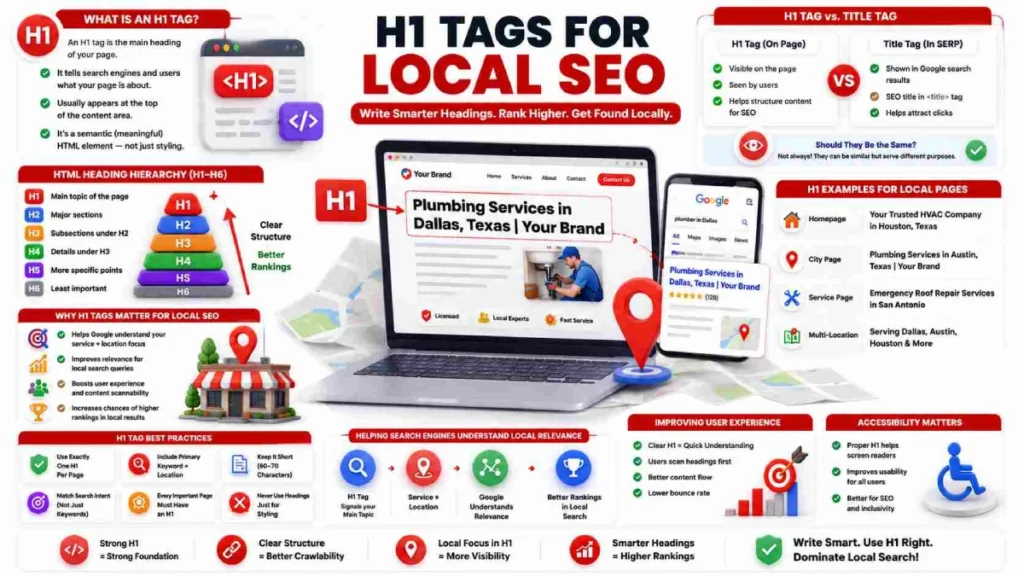
H1 tags tell Google what service you offer and which city you serve. Keywords in landing page heading tags are widely considered important by SEO professionals for improving relevance and visibility in search results.
When someone searches “emergency plumber in Denver,” Google checks your H1 tag to decide if your page is relevant. A heading like <h1>Emergency Plumbers in Denver, CO</h1> gives Google a clear signal. A heading like <h1>Our Services</h1> gives Google nothing to work with.
Most local searchers scan a page before they read it. A clear H1 confirms your business serves their area. A vague or missing H1 forces visitors to dig through paragraph text. Most will leave and go back to Google. According to the WebAIM Million 2026 report, 41.8% of homepages skip heading levels and 18.1% have multiple H1 tags. Both issues hurt local rankings and break the reading flow for visually impaired visitors.
H1 Tag Examples for Local Business Pages
The strongest local H1 tags combine a specific service with a target location. Here are real examples across different page types.
Homepage H1 Examples
Your homepage H1 should state what you do and where you do it. For most local businesses, a keyword-first approach works best in competitive markets.
| Approach | Example |
| Keyword First | `<h1>Emergency Plumbers in Bristol |
| Brand First | `<h1>Apex Plumbing |
| Hybrid | <h1>Bristol’s Trusted Emergency Plumbing Service</h1> |
Use keyword-first when your market is competitive. Use brand-first only if your business already has strong local name recognition.
City Landing Page H1 Examples
City landing pages need a clear service plus location formula in the H1. Here are examples across 4 industries:
| Industry | Optimized H1 |
| Plumbing | <h1>Emergency Plumbing & Drain Repair in Bristol</h1> |
| Dentistry | <h1>Emergency & Cosmetic Dentistry in Edinburgh</h1> |
| HVAC | <h1>Boiler Installation & AC Repair in Newcastle</h1> |
| Law | <h1>Criminal Defence & Personal Injury Lawyers in Cardiff</h1> |
Each example names the exact service and city. Google uses both signals to match the page to local search queries.
Service Page H1 Examples
Each service page needs its own unique H1 that names the specific service and location.
| Version | Example |
| Weak | <h1>CCTV Drain Surveys</h1> |
| Optimized | `<h1>Professional CCTV Drain Surveys in Leeds |
A weak service page H1 has no location signal. Google cannot tell if the page serves Leeds, London, or anywhere else.
Multi-Location Page H1 Examples
Multi-location businesses need a unique H1 on every city page. Copy-pasting the same H1 with only the city name swapped triggers duplicate content filters. Use different words and local details to keep each heading unique.
| Formula | Example |
| Keyword First | `<h1>AC Repair in Southampton, Hampshire |
| Action Oriented | <h1>Emergency Plumbers Leeds — 24/7 Rapid Call Out</h1> |
| Local Detail | <h1>Pest Control & Rodent Removal in Richmond, South-West London</h1> |
Use “AC Repair” on one page and “Air Conditioning Service” on another. Add local details like nearby neighborhoods or response times to keep each page unique.
H1 Tag Best Practices for Local SEO
The most important H1 tags for local SEO best practices are using one H1 per page, including your service and location, and matching your heading to search intent.
1. Use Exactly One H1 Per Page
Every page must include a single H1 tag. Think of it like a book title. A book has one title, not three. Your page should work the same way.
Google has confirmed that multiple H1s are technically allowed. But using more than one weakens your main topic signal. According to the WebAIM Million 2026 report, 18.1% of homepages already have multiple H1 tags. This usually happens because of poorly built themes or page templates.
One page. One H1. One clear topic for Google to rank you for.
2. Include Your Primary Keyword and Location in the H1
Your H1 must include both your main service and your target city. This is the most important local SEO signal your H1 can send to Google.
| Weak H1 | Optimized H1 |
| <h1>Plumbing Services</h1> | <h1>Emergency Plumbing Services in Austin, TX</h1> |
| <h1>Our Dental Clinic</h1> | <h1>Family & Cosmetic Dentistry in Portland, OR</h1> |
| <h1>Legal Help</h1> | <h1>Personal Injury Lawyers in Chicago, IL</h1> |
The weak versions tell Google what you do but not where. Google cannot match those pages to local searches in Austin, Portland, or Chicago.
Do not stuff multiple city names into one heading. An H1 like <h1>Plumber Austin, Austin Plumbing, Plumbers in Austin TX</h1> looks spammy to both Google and your visitors. Write it naturally, the way you would say it out loud.
3. Keep Your H1 Under 60 to 70 Characters
Your H1 tag should stay between 60 and 70 characters. There are 2 practical reasons for this.
Most local searches happen on mobile phones. A long H1 wraps across multiple lines and pushes your content below the screen. Also, if Google uses your H1 as a replacement for your title tag in search results, anything over 60 characters gets cut off and hurts your click-through rate.
A simple rule: if your H1 does not fit on one line on a phone screen, it is too long.
4. Match Your H1 with Search Intent
Your H1 should reflect what the visitor actually wants, not just the highest volume keyword. Local search intent falls into 2 types.
- Transactional intent means the visitor wants to call or book right now. Your H1 should emphasize speed and location.
Example: <h1>24/7 Emergency AC Repair in Birmingham</h1>
- Informational intent means the visitor is researching first. Your H1 should frame the page as a helpful resource.
Example: <h1>How Much Does Blocked Drain Clearance Cost in Bristol?</h1>
Getting intent wrong means visitors leave immediately. Match the H1 to the intent and your bounce rate will drop.
5. Make Sure Every Important Local Page Has an H1
Every page you want Google to rank needs its own unique H1 tag. This includes your homepage, service pages like “Boiler Repair” or “Roof Installation,” and city landing pages for locations like “Dallas” or “Fort Worth.”
A page without an H1 leaves Google guessing about the main topic. Pages without a clear H1 rarely rank for competitive local keywords, no matter how good the rest of the content is.
6. Never Use Heading Tags Just for Styling
H1, H2, and H3 tags exist to define page structure, not to control how text looks. Many website themes apply H1 tags to logos or banners simply because H1 default styling is large and bold. That wastes your most valuable heading on content with zero keyword value.
If you want text to appear in a certain size, use CSS. Keep your H1 reserved for one thing only: the main topic of your page.
How to Use H2 and H3 Tags to Support Local SEO
H2 and H3 tags help Google understand your full range of local services. Most local business owners focus only on the H1 and ignore everything below it. Your H2 and H3 tags can target secondary keywords, nearby neighborhoods, and service details that your H1 cannot cover alone. Never jump from H1 to H3 or from H2 to H4. Skipping levels breaks the structure Google and screen readers rely on.
Using H2 Tags to Target Secondary Local Keywords
Use H2 tags to target secondary services, nearby neighborhoods, and county-level keywords. A Bristol plumber’s city page might use <h2>Emergency Plumbing in Polk County</h2>, <h2>Serving Clifton, Redland, and Cotham</h2>, or <h2>Professional Drain Unblocking & Jetting Services</h2>. Each H2 targets a different local keyword without competing with the H1.
Using H3 Tags to Structure Local Service Details
Use H3 tags to break down the details under each H2 section. They work well for labeling individual services like “CCTV Drain Surveys” or “High-Pressure Water Jetting,” pricing sections, FAQs, and customer testimonials. Every H3 must sit under a relevant H2 and every H2 must sit under the H1.
H1 Tags for Multi-Location and Service Area Businesses
When implementing H1 tags for local SEO across multiple locations, every city page needs its own unique heading. Copy-pasting the same H1 with only the city name swapped is a common mistake. Google detects this pattern and removes those pages from search results.
Building a Repeatable H1 Formula for City Pages
Use a simple H1 formula that changes key details for each city page. Here are 3 that work well:
- Formula 1 — Keyword First: <h1>AC Repair in Southampton, Hampshire | AirTech</h1>
- Formula 2 — Action Oriented: <h1>Emergency Plumbers in Leeds | 24/7 Rapid Call Out</h1>
- Formula 3 — Local Detail: <h1>Pest Control & Rodent Removal in Richmond, South-West London</h1>
Use “AC Repair” on one page and “Air Conditioning Service” on another. Add local details like nearby neighborhoods or response times to keep each page unique.
Service Area Businesses vs. Brick-and-Mortar Heading Strategy
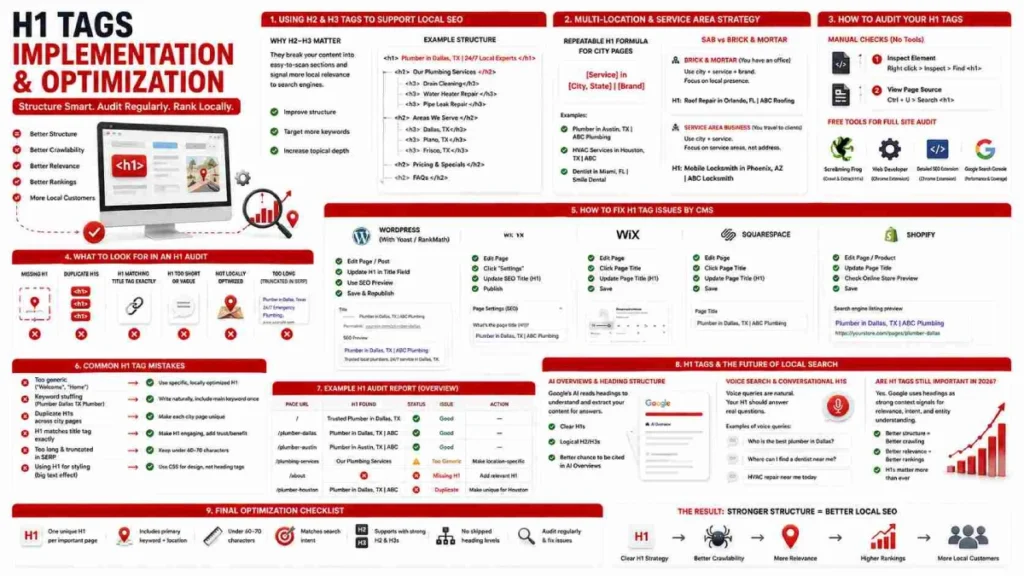
A service area business and a brick-and-mortar business need different H1 strategies. A brick-and-mortar business like a dental clinic or restaurant has a fixed address. Its H1 should confirm the location and main service. Example: <h1>Family Dentistry on King Street, Edinburgh</h1>
A service area business like a plumber or mobile mechanic travels to the customer. Its H1 should focus on coverage area and response speed. Example: <h1>Emergency Plumbers Covering All of Greater Manchester</h1>
For brick-and-mortar businesses, H2 tags should cover directions and nearby landmarks. For service area businesses, H2 tags should list suburbs covered and response times.
How to Audit Your Local Site’s H1 Tags
Auditing your H1 tags for local SEO means checking every page on your site for a single, optimized, and unique H1. Most local business websites have at least one problem: a missing H1, a duplicate H1 across city pages, or an H1 with no location signal. A quick audit finds and fixes these issues before they cost you rankings.
How to Check H1 Tags Without Any Tools
You can check the H1 tag on any page using your browser in under 60 seconds.
Method 1 — Inspect Element Right-click on the main heading and select Inspect. Look for text wrapped in <h1> and </h1> tags in the code panel.
Method 2 — View Page Source Press Ctrl + U on Windows or Cmd + Option + U on Mac. Press Ctrl + F and search for <h1> to find the heading.
Free Tools to Audit H1 Tags Across Your Whole Site
For sites with multiple city pages, use a free tool to audit all H1 tags at once.
- Screaming Frog (Free Version) crawls up to 500 URLs for free. It displays the H1 tags for all pages in a single report and highlights missing H1s, duplicate H1s, and overly long H1 tags.
- Detailed SEO Extension or Web Developer Chrome Extension shows the full heading structure of any page in one click inside your browser.
- Google Search Console does not flag H1 issues directly. But if a local page loses clicks while impressions stay the same, Google may have replaced your title tag with a weak H1 in search results.
What to Look for in an H1 Audit
Check every local page for these 6 common H1 issues:
- Missing H1 — the page has no H1 tag at all
- Multiple H1s — the page has 2 or more H1 tags
- Duplicate H1s — the same H1 appears across multiple city or service pages
- No location signal — the H1 names a service but no city or region
- Vague H1 — headings like <h1>Home</h1> or <h1>Services</h1> with no keyword value
- Blank H1 — an empty heading tag caused by a line break styled as Heading 1 in a visual editor
How to Fix H1 Tag Issues by CMS
The way you fix an H1 tag depends on which platform your site is built on.
- WordPress Open the page in the Gutenberg editor. Click the main heading block. Select Heading from the block type dropdown. Choose H1 from the heading level options. Plugins like Yoast SEO and RankMath show a live heading preview below the editor.
- Wix Click the main text element and select Edit Text. Choose Heading 1 from the themes dropdown. Click SEO and accessibility. Confirm H1 is selected under the HTML tag option.
- Squarespace Click Edit on the page section. Highlight the main heading text. Select Heading 1 from the paragraph format dropdown. Use global CSS styles to control visual size without changing the heading tag.
- Shopify Most Shopify themes wrap the homepage logo in an H1 tag by default. This wastes your most important heading on an image with no keyword value. Open the header.liquid file in your theme code. Replace the <h1> wrapper around the logo with a <div> tag. Then add a keyword-rich H1 below the opening <body> tag.
Common H1 Tag Mistakes Local Businesses Make
Most local business websites make at least one of these H1 mistakes without knowing it.
- Using the business name alone as the H1 — <h1>Apex Plumbing</h1> tells Google nothing about your service or location.
- No location in the H1 — <h1>Emergency Plumbing Services</h1> has no city signal. Google is unable to associate it with local search queries.
- Same H1 across all city pages — Copy-pasting <h1>Our Local Services</h1> on every location page triggers duplicate content filters.
- Keyword stuffing the H1 — <h1>Plumber Bristol, Bristol Plumbing, Emergency Plumber BS1</h1> looks spammy to Google and damages user trust.
- Missing H1 on key pages — Service pages, city landing pages, and contact pages without an H1 give Google no primary topic signal.
- Multiple H1 tags on one page — Caused by poorly built themes or page templates that add extra H1 tags automatically.
- Using H1 tags only for styling—such as wrapping logos or banners,wastes your most important heading on content that has no keyword value.
- Shopify logo wrapped in an H1 — Many Shopify themes wrap the homepage logo in an H1 by default. This puts your H1 on an image path instead of a keyword-rich heading.
- Blank H1 tags — Empty line breaks styled as Heading 1 in visual editors create empty <h1> tags that confuse crawlers.
- Skipping heading levels — Jumping from H1 to H3 breaks the page structure that both Google and screen readers depend on.
H1 Tags and the Future of Local Search
H1 tags for local SEO are becoming more important as Google shifts toward AI-driven search. A clean heading structure is now a signal for AI systems, voice assistants, and traditional search algorithms all at once.
- Google’s AI Overviews pull answers from pages with clear, well-structured headings. Writing H2 and H3 tags as direct questions followed by a short answer gives Google’s AI exactly what it needs to cite your page. For example: <h2>How Much Does Boiler Installation Cost in Leeds?</h2> followed by a direct answer paragraph.
- Voice search queries are more conversational than typed searches. A user might type “plumber Bristol” but say “Who is the closest emergency plumber open now in Clifton?” Using H2 and H3 tags that reflect natural, conversational questions can improve your chances of being chosen as a spoken answer by voice assistants like Google Assistant, Siri, and Alexa.
H1 tags for local SEO remain one of the most important on-page signals in 2026. Google still relies on heading tags to understand page structure, validate Schema markup, and support your Google Business Profile relevance. A well-written H1 signals to Google that a real business created this page for a real local audience.
FAQs
What is an H1 tag in local SEO?
An H1 tag is the main heading of a webpage that tells Google what service you offer and where. A strong local H1 looks like this: <h1>Emergency Plumbing in Austin, TX</h1>.
Should my H1 tag include my city name?
Yes, always include your target city in the H1 when targeting local search traffic. A heading like <h1>Family Dentistry in Portland, OR</h1> gives Google the geographic signal it needs.
Can I have more than one H1 tag on a page?
Use exactly one H1 per page. Multiple H1 tags dilute your primary topic signal and confuse both Google and screen readers.
What’s the difference between a title tag and an H1 tag?
The title tag appears in Google search results and the H1 tag appears on your page. The title tag earns the click and the H1 confirms the visitor landed in the right place.
Should my H1 and title tag be the same?
They should target the same keyword and location but use different wording. Your title tag focuses on click-through rate and your H1 focuses on on-page clarity.
Conclusion
H1 tags for local SEO tell Google what service you offer and which city you serve. Every local page needs exactly one clear H1 that combines your service with your target location. Your H2 and H3 tags do the rest by expanding your local keyword coverage and structuring your content for both Google and your visitors.
The rules are simple. One H1 per page. Include your service and city. Fix heading issues on your CMS before they cost you rankings. As Google moves toward AI search and voice queries, a clean heading structure is no longer optional. It is the foundation every local business page needs to rank.
Start today: Run a free Screaming Frog crawl on your site, find every missing or duplicate H1, and fix them one page at a time.

9 July 2026
Internal Linking Strategy for Local SEO Websites

9 July 2026