Internal linking for local SEO is one of the most ignored ranking factors on local business websites. Pages exist but nothing connects them. Google visits your homepage and cannot find the rest of your site.
Your service pages, city pages, and blog posts sit unlinked and undiscovered. Search engines do not rank those pages, no matter how well you write them.
Internal linking fixes this. It creates clear paths for Google to follow across your entire site. This guide shows you how to structure your site, link your location and service pages correctly, choose the right anchor text, and fix the gaps hurting your rankings today.
What Is Internal Linking and Why Does It Matter for Local SEO
Internal linking means linking from one page on your website to another page on the same website. When your plumbing homepage links to your Dallas service page, that is an internal link.
These links do two things. They help visitors navigate your site.They help Google identify your most important pages. Those pages almost always rank lower, no matter how strong the content is.
For local businesses, this is a real problem. A cleaning company serving 6 cities needs Google to find and rank all 6 location pages. Without internal links connecting those pages to the rest of the site, Google may never crawl them properly. Internal links are how you make sure every important page gets found, gets crawled, and gets a fair chance to rank.
How to Handle Internal Linking When You Have Multiple Location Pages
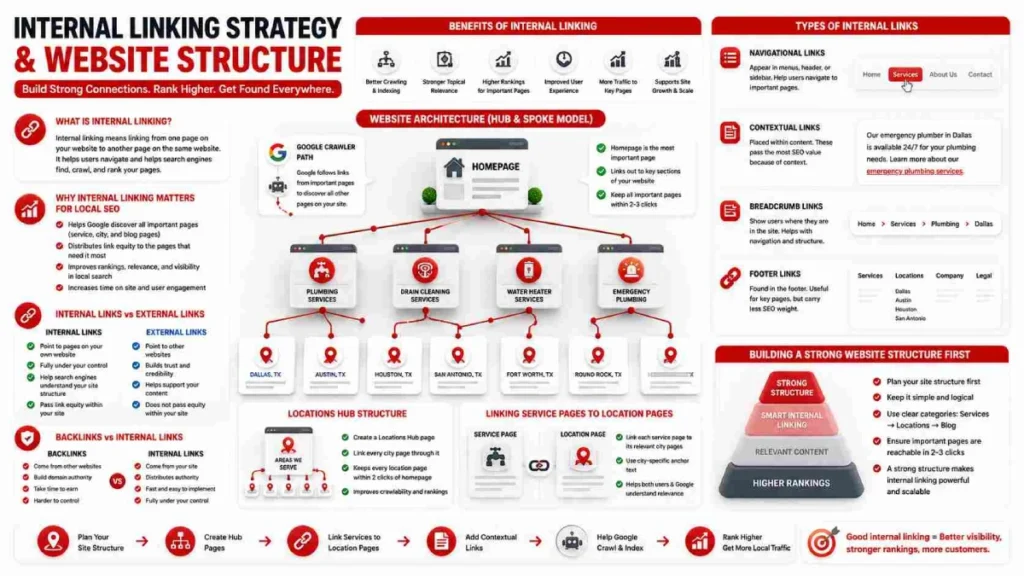
Create a Locations Hub page and link every city page through it. This is the most practical system for local websites with more than 5 location pages.
The hub page, usually titled “Areas We Serve,” sits one click from the homepage. The homepage links to the hub. The hub links to every city page.Each city page links to the main service page. That structure keeps Google from missing any location page and ensures every city page gets crawled within 2 clicks.
One mistake to avoid is using identical anchor text across different city pages.. Linking to both your Austin page and your Round Rock page with the phrase “plumbing services Texas” sends Google a confusing signal. Use city-specific anchor text for every location page.“Plumbing services in Austin” takes users to the Austin city page.. “Plumber in Round Rock” points to Round Rock. This structure prevents pages from competing against each other and keeps them clearly defined for search engines.
Types of Internal Links
There are 4 main types of internal links, and each one serves a different purpose on your website.
- Navigational links appear in your menu, header, and footer. Links like “Services,” “About Us,” and “Contact” are navigational links. They help visitors find the most important pages on your site without searching for them.
- Contextual links sit inside the body content of a page. These are the most valuable type for SEO. When your blog post about roof maintenance links to your “Roof Repair in Houston” service page, that is a contextual link. Google pays close attention to these because the surrounding text gives context about what the linked page covers.
- Breadcrumb links show visitors where they are inside your site structure. A path like Home → Services → Plumbing → Austin tells both the visitor and Google how your pages relate to each other. Breadcrumbs are especially useful on local sites with multiple service categories and city pages.
- Footer links appear at the bottom of every page. Most local business websites use footer links to point to key service pages, location pages, and legal pages like Privacy Policy and Terms of Service. Footer links carry less SEO weight than contextual links but still help Google discover important pages.
For local SEO, contextual links matter most. A link inside a paragraph that reads “our emergency plumber in Dallas is available 24 hours” tells Google exactly what the destination page is about. A footer link with the text “Dallas” tells Google far less.
Internal Links vs External Links
Internal links connect pages within your own website. External links point to other websites. Internal links stay within your own website and are completely under your control. You decide where they go, what anchor text they use, and how many you add. No outreach. No waiting. That makes internal linking one of the fastest improvements you can make to your site.
External links point outward. Linking to trusted sources like Google Support or the Better Business Bureau tells Google your content is well researched. But the bigger win comes from earning links back to your site from other websites. That builds domain authority over time. Internal linking costs nothing and works immediately. External link building takes months. For most local businesses, internal links come first.
What Is the Difference Between Backlinks and Internal Links?
Backlinks come from other websites.Internal links are links that originate from your own website. When a local news site links to your plumbing business, that is a backlink. When your homepage links to your Austin service page, that is an internal link. Backlinks build your site’s overall authority. Internal links distribute that authority to the pages that need it most.
Backlinks take time. You need another website owner to choose to link to you. That means outreach, relationship building, and patience. Internal links cost nothing and take minutes to add. A location page with no backlinks can still rank well if 8 to 10 strong internal links point to it from relevant pages across your site. Start with internal links. Build backlinks alongside them over time.
Why Internal Links Are Important for SEO
Internal links help Google find your pages, understand what they are about, and decide how to rank them. Without internal links, Google has to work harder to discover your content. Pages buried deep in your site with no links pointing to them often get crawled less frequently. Some never get indexed at all. According to Ahrefs, 26.9% of pages have no internal links pointing to them. Search engines struggle to discover and rank those pages.
Internal links also pass authority. Your homepage carries the most authority on your site. Every internal link from your homepage to a service page like “Roof Repair” or “AC Installation” sends some of that authority to the destination page. The more authority a page receives, the better its chances of ranking.
For local businesses, internal links do one more important job. They help Google connect your services to your locations. When your “Plumbing Services” page links to city pages like Austin, Round Rock, and Pflugerville, Google understands that you serve those specific areas. That connection strengthens your relevance for local search queries in each city.
Benefits of Internal Linking
Internal linking delivers 5 direct benefits for any local business website.
- Faster indexing. Google follows links to find pages. More internal links pointing to a page means Google finds and indexes it faster.
- Better authority distribution. Links from strong pages like your homepage carry authority to weaker pages like new city pages or fresh blog posts.
- Stronger local relevance. Linking your “Electrician Services” page to city pages like Phoenix, Tempe, and Mesa tells Google exactly where you operate.
- Lower bounce rate. Relevant internal links keep visitors moving through your site. A reader on your blog who clicks through to your service page is one step closer to becoming a customer.
- Less dependence on backlinks. In low-competition local markets, a site with strong internal linking can outrank competitors that have more backlinks but poor site structure.
How to Build an Internal Linking Strategy
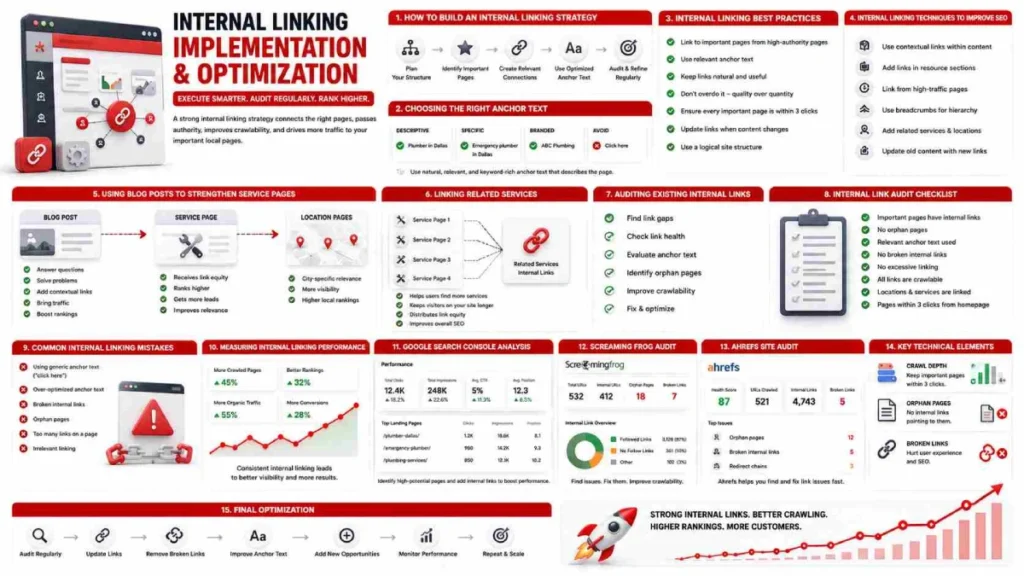
Start by mapping your most important pages, then build links from high-authority pages down to the pages that need the most support.
Most local business websites have 3 types of pages that matter most for SEO. Service pages like “Roof Repair” or “AC Installation.” Location pages like “Plumber in Austin” or “Electrician in Mesa.” And blog posts that target informational keywords related to your services.
Your strategy connects all three.
Step 1. Identify your priority pages.These are the pages you want to prioritize for ranking. For most local businesses, priority pages are service pages and location pages. List them out before touching a single link.
Step 2. Check where your authority lives. Your homepage carries the most authority on your site. High-traffic blog posts and well-established service pages carry authority too. These are your linking sources.
Step 3.Create links from strong pages to your most important pages. Add contextual links inside the body content of your strongest pages. A link from your homepage to your “Plumbing Services in Dallas” page passes direct authority where you need it most.
Step 4. Fix orphan pages. Use a free tool like Google Search Console or Screaming Frog to find pages with zero internal links pointing to them. Every priority page needs at least 3 internal links pointing to it.
Step 5. Use descriptive anchor text. Avoid generic phrases like “click here” or “read more.” Use specific phrases like “emergency plumber in Houston” or “roof repair services Austin” that tell Google what the destination page covers.
Step 6. Link every new page before publishing. Before any new service page, location page, or blog post goes live, add at least 2 internal links pointing to it from existing pages. Do not publish orphan pages.
Step 7. Review and update every 6 months. Internal linking is not a one-time task. As your site grows, new pages need links and old links need checking. A 6-month audit keeps everything connected and current.
Internal Linking Structure and Site Architecture
Your site architecture decides how link authority flows across your pages. The best structure for local websites is the hub and spoke model. Your homepage links to main service pages like “Plumbing Services” and “Roof Repair.” Those service pages link to city pages like “Plumber in Austin” and “Roofer in Dallas.” Each city page links back to its parent service page. Every key page stays within 2 to 3 clicks of the homepage.
No important page should sit more than 3 clicks from your homepage. Pages buried deeper get crawled less often and rank lower. Fix your structure before you fix your links. Using only one without the other leads to limited results.
Internal Linking Best Practices
Follow these practices to make every internal link on your site work harder for both visitors and search engines.
- Link to relevant pages only. Every internal link should make sense for the reader. A blog post about roof maintenance linking to a “Roof Repair in Denver” page is relevant. That same post linking to a “Pool Cleaning in Miami” page is not.
- Use descriptive anchor text. Replace “click here” and “read more” with specific phrases like “emergency plumber in Houston” or “AC repair in Scottsdale.” Descriptive anchor text tells Google what the destination page covers.
- Give every priority page at least 3 internal links. According to Semrush, pages with more internal links pointing to them consistently rank higher than pages with few or none.
- Ensure important pages are no more than three clicks away from the homepage. Service pages like “Electrical Services” and location pages like “Electrician in Tampa” should never sit deeper than 3 clicks from your homepage.
- Vary your anchor text. Do not use the same phrase every time you link to a page. Link to your Austin plumbing page with “plumbing services in Austin” once and “Austin plumber” another time. Variation looks natural and reduces cannibalization risk.
- Fix broken internal links immediately. A broken link wastes the authority that page could have passed. Run a check with Screaming Frog or Google Search Console every 6 months.
- Link every new page before it goes live. Add at least 2 incoming internal links to every new service page, location page, or blog post before publishing. Never launch an orphan page.
- Keep the total number of links on any single page under 150. Too many links on one page dilutes the authority passed through each individual link.
How to Choose the Right Anchor Text
Use specific, descriptive phrases that tell Google exactly what the destination page is about. Anchor text is the clickable phrase that carries a visitor from one page to another. Google treats it as a relevance signal for the linked page. There are 4 types to know.
- Exact match. “Plumber in Austin” linking to your Austin plumbing page. Use this once or twice per page maximum.
- Partial match. “Affordable plumber in Austin” or “find a plumber in Austin.” Natural phrasing with strong relevance signals. Use these most often.
- Branded. Your business name as the anchor. Good for homepage and contact page references.
- Generic. “Click here” or “read more.” These tell Google nothing. Avoid them entirely.
For local service pages and city pages, partial match anchors work best. A link reading “our roof repair team in Dallas” tells Google more than “roof repair Dallas” ever could. One rule applies across all types. Never use the same anchor text to link to two different pages. Doing so sends Google a conflicting signal and can hurt both pages.
Internal Linking Techniques to Improve SEO
These 6 techniques move authority to the right pages, improve crawlability, and strengthen your site’s overall ranking power.
1. Link from your highest traffic pages. Find your top 5 visited pages using Google Search Console. Add contextual links from those pages to your priority service and location pages. High traffic pages carry more authority. Links from them deliver more value.
2. Use the pillar and cluster technique. Create one strong pillar page around a broad topic like “Plumbing Services.” Then create supporting cluster pages around related topics like “Drain Cleaning,” “Water Heater Repair,” and “Emergency Plumbing.” Link every cluster page back to the pillar. Link the pillar to each cluster. This builds topical authority across the entire group.
3. Update old content with new internal links. Go back to blog posts and service pages published 6 or more months ago. Add links from those pages to newer pages that need authority. Old pages with established rankings pass more value than brand new pages.
4. Add contextual links inside body content. Links sitting inside a paragraph carry more weight than links in footers, sidebars, or navigation menus. A link inside a sentence like “our licensed electrician in Tampa handles same-day repairs” signals relevance far more clearly than a footer link that just reads “Tampa.”
5. Create supporting content that links to money pages. Write blog posts that target informational keywords like “how to choose a roofing contractor” or “signs your AC needs replacing.” Add a contextual link in each post that points to the relevant service or city page. These posts funnel both traffic and authority to pages that convert.
6. Use breadcrumb navigation. Breadcrumbs like Home → Services → Plumbing → Austin create an automatic internal linking layer across your entire site. They reinforce page hierarchy, reduce click depth, and help Google understand how your pages relate to each other.
Internal Linking for Local SEO
Local SEO internal linking connects your services to your locations so Google ranks you in the right cities.
Building a Strong Website Structure First
Fix your site structure before adding any internal links. Follow this pattern: Homepage links to Service pages like “Roof Repair” and “Gutter Installation.” Those service pages link to Location pages like “Roofer in Dallas” and “Roofer in Plano.” Every key page stays within 2 to 3 clicks of the homepage.
Linking Related Services to Improve Engagement
Link between related service pages to keep visitors on your site longer. A visitor reading your “Drain Cleaning” page may also need “Water Heater Repair” or “Pipe Replacement.” Add a contextual link between those pages and Google sees them as topically connected. Every link should serve the reader first.
Using Blog Posts to Strengthen Key Service Pages
Blog posts are the most underused internal linking asset on local business websites. Every post should contain at least 1 to 2 links pointing to a relevant service or location page. A post titled “5 Signs You Need a New Roof” linking to your “Roof Replacement in Houston” page moves early visitors toward a page that converts. It also passes authority directly to your most important local pages.
Auditing Your Site’s Existing Internal Links
An internal link audit finds broken links, orphan pages, and weak connections that quietly hurt your rankings.
Start with Google Search Console. Go to Links, then Internal Links. Any important page sitting near the bottom of that list needs more links pointing to it. Then run a crawl with Screaming Frog or Ahrefs to find broken links returning 404 errors, orphan pages with zero incoming links, and city or service pages buried more than 3 clicks from the homepage.
Fix issues in this order: broken links first, orphan pages second, underpowered pages third. Broken links waste authority and send visitors to dead ends. Orphan pages like an unlinked “Plumber in Round Rock” or “Electrician in Mesa” page get crawled rarely and rank poorly. Finish by checking your anchor text. If every link pointing to a page uses the same phrase, vary it. Run this audit every 6 months minimum.
Internal Link Audit Checklist
Use this checklist every 6 months to keep your internal links clean and working.
- Each service page receives a minimum of three internal links.
- Every location page has at least 3 internal links pointing to it
- No important page sits more than 3 clicks from the homepage
- Zero orphan pages exist on the site
- No internal links return a 404 error
- Anchor text is descriptive and varied across all links
- No two different pages share the same anchor text
- Remove generic anchors like “click here” and “read more.”
- Every new page has at least 2 incoming internal links before publishing
- No single page carries more than 150 internal links
- Every blog post links to at least 1 service or location page
- Breadcrumb navigation is active and correctly structured
- The Locations Hub links to every active city page
- Every city page links back to its parent service page
Common Internal Linking Mistakes to Avoid
- Publishing location pages like “Plumber in Austin” or “Roofer in Dallas” with no internal links pointing to them
- Linking only from the homepage and ignoring service pages, blog posts, and location pages
- Using the same anchor text for every internal link pointing to the same page
- Using generic anchors like “click here,” “read more,” or “learn more”
- Burying important pages more than three clicks deep from the homepage reduces their visibility.
- Linking to the wrong page with a keyword and causing 2 pages to compete against each other
- Deleting pages without redirecting the internal links pointing to them
- Publishing new pages with zero incoming internal links
- Adding too many links on one page and diluting the authority passed through each link
- Never updating old blog posts with links to newer service or location pages
- Ignoring broken internal links for months because they are not visible to visitors
- Treating all pages equally instead of prioritizing service pages and location pages that generate leads
FAQs
What is internal linking in SEO?
Internal linking means connecting one page on your website to another page on the same website. These links help Google discover your pages and distribute authority across your site.
What is the ideal number of internal links a page should contain?
Every important page should have at least 3 internal links pointing to it. Keep the total number of links on any single page under 150.
What makes effective anchor text for internal links?
Partial match anchor text like “roof repair in Dallas” works best for local pages. Avoid generic phrases like “click here” and vary your anchor text across links pointing to the same page.
How can I identify orphan pages on my website?
Run a full site crawl using Screaming Frog or Ahrefs to find pages with zero incoming internal links. Google Search Console also shows which pages receive the fewest internal links under the Links section.
How often should I review my internal linking structure
Audit your internal links at least once every 6 months. Regular audits catch broken links, orphan pages, and linking gaps before they affect your rankings.
What tools help with internal link auditing?
Google Search Console is free and sufficient for most small local websites. Screaming Frog and Ahrefs provide deeper data including broken links, orphan pages, and click depth analysis.
Will internal linking still matter in AI search?
Yes, search engines still rely on links to discover and evaluate pages even as AI search evolves. A well linked site performs better in both traditional and AI driven search results.
Conclusion:
Internal linking is one of the most practical and cost-free ways to improve your local SEO. It helps Google find every page on your site, understand what each page covers, and rank the right pages for the right searches. A clear site structure, descriptive anchor text, properly linked location and service pages, and a regular audit schedule are all it takes to build a system that works.
Most local businesses overlook this completely. That is what makes it such a strong opportunity. Fix your internal links before spending another dollar on ads or backlinks.
Ready to get started? Do a quick review in Google Search Console today. Find your most important service and location pages. Check how many internal links point to each one. If the answer is fewer than 3, you have found your starting point.


8 July 2026