
Your page ranks on Google. But nobody clicks it. That one problem costs local businesses thousands in lost revenue every year.
The reason is almost always the same. That short text snippet below your page title does nothing. No location. No reason to click. No call to action. A competitor with a smarter 150-character description is taking every customer you worked to earn.
That changes here. This article shows you how to write meta descriptions for local pages that get clicked. You will learn the proven formula, the right length, real examples across industries like plumbing, law, and dental, and the mistakes draining your local traffic every day.
What Is a Meta Description?
A meta description is a short HTML tag that provides a concise overview of a web page. Search engines may display it below the title in search results.
It lives inside the head section of your page code and looks like this: <meta name=”description” content=”Your description goes here.”> Search engines like Google, Bing, and Yahoo read this tag every time they crawl your site. When your page is shared on Facebook or LinkedIn, the meta description may be used as the preview text shown with the link.
One thing to understand: a meta description does not directly affect your rankings. Google confirmed this in 2009. What it does affect is whether someone clicks your result. For local businesses, that click decision happens fast, often on a mobile screen, often within seconds. That behavior shapes how your page performs in local search over time.
Why Meta Descriptions Matter for Local SEO
Meta descriptions matter for local SEO because they directly influence whether a nearby customer clicks your listing. Local searchers typing queries like “emergency plumber in Austin” or “dentist near me” are close to a decision. Your meta description has roughly 150 characters to show them you are the right choice.
Local searchers want fast answers. They need a clear location, a specific service, and a reason to trust you. A well-written description delivers all three before they visit your site.Businesses that optimize their local meta descriptions often experience improved search visibility, higher click-through rates, and better organic conversions..
There is also a bounce rate factor most businesses miss. When your description matches your page content, visitors are less likely to leave right after clicking. That signals quality to Google. Over time, stronger click-through rates and lower bounce rates build your visibility in local search results.
How Meta Descriptions Appear in Search Results
Meta descriptions appear as short text directly below your page title and URL in Google search results. Every search listing has three visible parts: the clickable blue title, the green URL, and the descriptive text beneath. That text is your meta description.
When a search query matches words in your description, Google bolds those terms. This makes your listing stand out. But bolded characters take up more pixel space than normal text. This can cut off your message before the reader reaches your call to action.
Display limits differ between desktop and mobile. On a desktop, Google shows 150 to 160 characters before cutting off. On mobile, that drops to 114 to 120 characters. If your page includes a publication date or rich snippet, the visible space shrinks further to around 142 characters on desktop and 99 characters on mobile. Write to the mobile limit so your full message shows on all devices.
How Meta Titles and Descriptions Impact SEO
Your meta title and description work together as a two-part advertisement in search results. The title signals relevance to Google. The description gives searchers a clear reason to click. One drives rankings. The other drives traffic.
The title tag is a direct ranking factor. A study of 100 top-ranking local businesses found that 93% included their target keyword in the title tag, 86% included their location, and 82% combined both. The average title length was 59 characters.
The meta description does not affect rankings directly. It affects click-through rate, and click-through rate affects rankings over time. When your page earns more clicks than competitors at the same position, Google treats that as a relevance signal and moves your page up. For local businesses like plumbers, dentists, and law firms, that position shift can mean the difference between steady calls and none at all.
Meta Descriptions and Click-Through Rates (CTR)
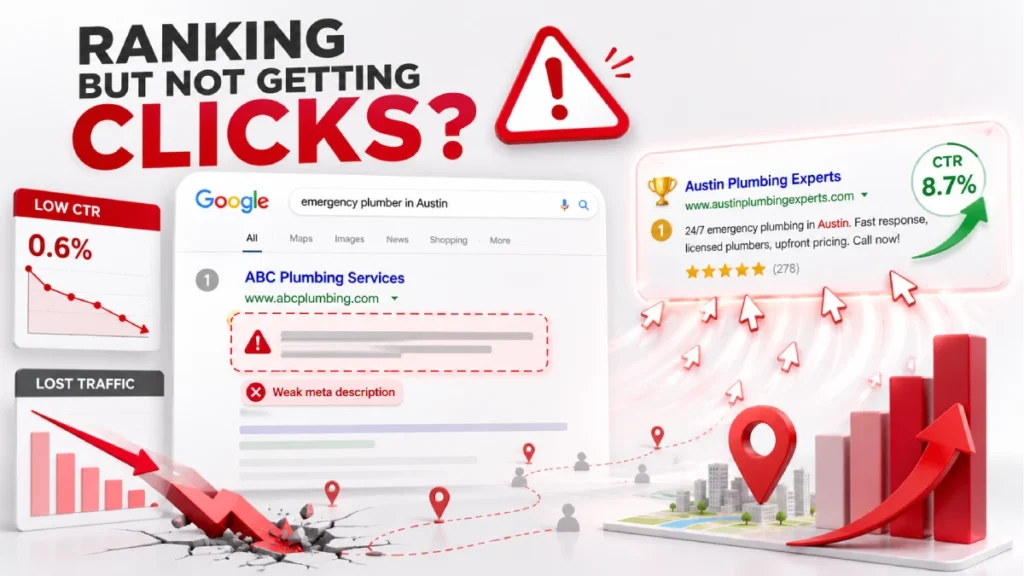
Your meta description is one of the biggest levers for improving click-through rate in local search.CTR measures the percentage of users who click on your listing after viewing it in search results. The formula is simple: total clicks divided by total impressions, multiplied by 100. A strong meta description moves that number up.
CTR performance is not equal across all positions. Top positions earn more clicks, but your description decides whether you beat or fall short of the average for your position. Pages that beat their expected CTR move up in rankings. Pages that fall short drop toward positions 6 through 10.
Google Search Console makes it straightforward to find where you stand. Pages with a CTR above 3% are performing well. Pages between 1% and 2.99% need refinement. Pages below 1% need an immediate rewrite. Prioritize high-impression local pages first, especially for businesses like roofing companies, dental clinics, and law firms, where a single additional click can mean significant revenue.
Keyword Optimization for Meta Titles and Descriptions
The most important rule: put your primary local keyword within the first 40 characters of your title tag. Front-loading your core service and location together, for example “AC Repair in Dallas, TX” instead of “Dallas’s Best HVAC Company,” secures immediate relevance for both Google and the person searching.
For meta descriptions, weave your primary keyword into the first sentence. Use the rest of the space for secondary terms like neighborhood names, nearby cities, or related services. A Chicago personal injury lawyer page can naturally include terms like “Cook County,” “car accident claims,” and “free consultation” without sounding forced.
Never stuff keywords in your title or description. Keep keyword density below 10% of your word count. Phrases like “plumber Austin, Austin plumber, best plumber Austin TX” read as spam. They also trigger Google to replace your description with auto-generated text.
Optimizing Meta Descriptions for Better Local SEO Performance
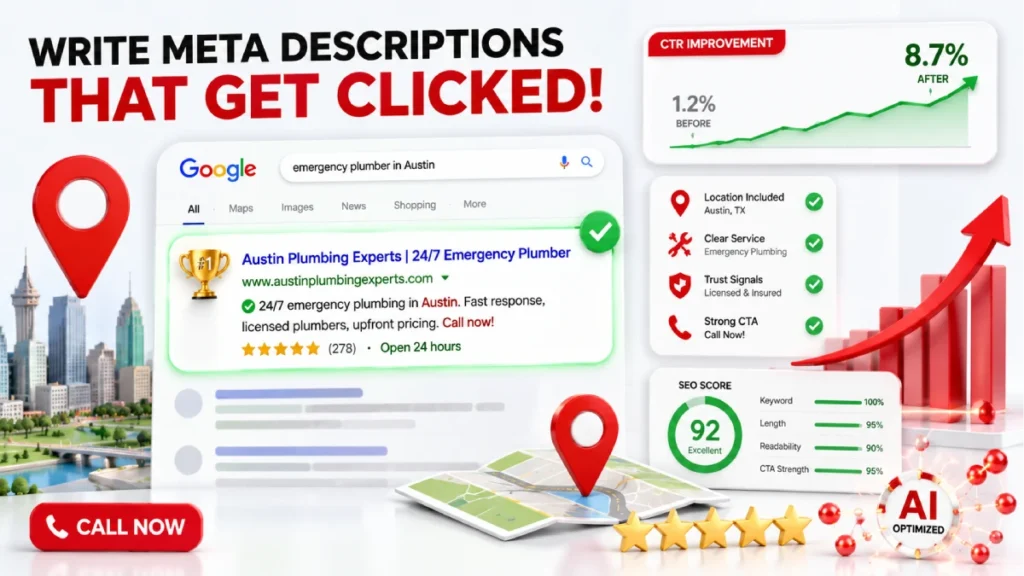
To optimize meta descriptions for local SEO, every location page needs a unique description written for that city, service, or territory. Using one generic description across multiple pages is a costly mistake.
For single-location businesses, add your location across core pages like your homepage, service pages, and contact page. For multi-location businesses, build a dedicated landing page for each location. Each page must include the exact business name, address, and phone number that matches your Google Business Profile. Inconsistent NAP information can create confusion for both search engines and potential customers.
Go beyond just adding a city name. Include hyper-local details that national competitors cannot match. Mention a nearby landmark, neighborhood, or cross-street. A description like “Serving Hyde Park and Downtown Chicago, two blocks from Millennium Park” is far stronger than “serving Chicago and surrounding areas.”
Optimizing Meta Descriptions for Search Intent
Every meta description must match the intent behind the search query it targets. Local searches fall into four intent categories. Each needs a different approach.
Informational searches come from people seeking answers. Queries like “how to unclog a drain” or “signs you need a roof inspection” need descriptions with helpful, educational language — not a sales pitch.
Navigational searches come from people looking for a specific business. Queries like “Joe’s Plumbing Austin location” need descriptions with the exact address, phone number, and business hours upfront.
Commercial investigation searches come from people comparing options. Queries like “best family lawyer in Miami” need descriptions that highlight credentials, years of experience, and review scores.
Transactional searches come from people ready to hire or book now. Queries like “emergency AC repair Houston” need descriptions with availability, guarantees, and a direct call to action like “Call now for same-day service.”
Matching the wrong tone to the wrong intent costs clicks. A transactional page for emergency plumbing or same-day locksmith work that uses soft language will lose clicks to a competitor whose description matches the urgency the searcher already feels.
Meta Description Best Practices for Local Businesses
The best local meta descriptions do one job: convince a nearby searcher to click your result. They are not page summaries. They are short advertisements written for one specific person with one specific need in one specific location.
Characteristics of a Great Meta Description
A great local meta description has four elements: a clear location signal, a specific value proposition, natural keyword placement, and a direct call to action. Remove any one of these and the description loses its power.
Use action-oriented language. Weak openers like “We provide services for…” lose readers fast. Lead with strong verbs like “Get,” “Call,” “Book,” “Find,” or “Save” to create momentum.
Include a value proposition that sets you apart. Generic claims such as “best service in town” provide little value to potential customers. Specific claims like “family-owned for 22 years,” “5-star rated on Google,” or “60-minute emergency response” give searchers a real reason to choose you.
Match the emotional state of your searcher. For urgent services like emergency plumbers, electricians, and locksmiths, lead with speed and reliability. For experience-based businesses like restaurants, spas, and event venues, use language that builds anticipation.
One technical rule most businesses miss: never use double quotation marks inside your meta description. Google cuts off everything after the second quotation mark. Use single quotation marks instead.
5 Tips for Writing Meta Descriptions and Titles
These five practices produce stronger click-through rates across industries like healthcare, home services, legal, and hospitality.
1. Front-load your local keyword and location. Place your service and city within the first 40 characters of your title tag. A title such as “Roof Repair in Phoenix, AZ | Desert Roofing Co.” is often more effective than simply using “Desert Roofing Co.”
2. Add hyper-local identifiers. City names alone are not enough in competitive markets. Include neighborhood names, landmarks, or cross-streets that national directories like Yelp and Angi cannot match. A phrase like “serving Buckhead and Midtown Atlanta, near Piedmont Park” signals local presence fast.
3. Use numbers and social proof. Numbers stand out in a page full of text. Phrases like “4.9-star rating,” “over 500 five-star reviews,” or “serving Austin since 1998” build trust and beat vague claims every time.
4.Write a distinct description for every page. Duplicate descriptions across pages like your Austin, Dallas, and Houston location pages confuse search engines. Each page needs an original copy tied to its specific location and service.
5. Test against pixel width, not just character count. A 155-character description with many uppercase letters can truncate earlier than a 160-character description in standard text. Use a preview tool to check your description at 920 pixels on desktop and 680 pixels on mobile.
Should You Write Meta Descriptions If Google Rewrites Them?
Yes. Always write meta descriptions even though Google rewrites them most of the time. A Portent study found Google rewrites meta descriptions 68% of the time on desktop and 71% on mobile. An Ahrefs study puts the rewrite rate at 62.78% for top 10 results. Your description survives roughly 30% of the time.
That 30% covers the searches that matter most. Google keeps your description for high-volume terms like “emergency plumber Austin” or “divorce lawyer Miami” when it closely matches the query. Rewrite rates rise as rankings drop. Pages in positions 1 through 3 see rewrite rates of 60% to 63%. Pages on page 2 and beyond face rates above 75%.
There is one more reason to write your description. When Google rewrites it, it pulls text from your page content. Vague opening paragraphs produce weak auto-generated snippets. Strong, intent-matched content at the top of every local page gives Google better material to use, even when it chooses to ignore your meta tag.
Using AI Tools to Generate Meta Titles and Descriptions
AI tools can generate meta titles and descriptions at scale, but every output needs human review before publishing. For local businesses managing many pages, tools like Yoast SEO and Rank Math Content AI have made this process much faster.
Yoast SEO generates metadata based on real-time content analysis inside your page editor. Rank Math Content AI offers over 40 AI templates and reads live competitor data from the current SERP to suggest local meta tags. Its bulk generation feature helps multi-location businesses manage pages across cities like Houston, Dallas, and San Antonio at the same time.
The risk with any AI tool is real. These tools often produce incorrect phone numbers, wrong service areas, and false credentials. Every AI-generated description needs a manual check. Verify the location, confirm the character count, and remove any false claims before publishing. AI handles the volume. Human review protects the accuracy.
Tools for Generating and Managing Meta Descriptions
The right tools help you write, audit, and manage meta descriptions across all your local pages.
Writing and Optimization Tools
- Rank Math SEO: Free version available; Pro plan starts at $95.88/year. Includes a local schema generator and AI-powered meta templates built into your WordPress editor.
- Yoast SEO Premium : $118.80/year per site. Includes an AI metadata generator and automated JSON-LD local business schema. Best for beginners who want guided optimization.
Auditing and Crawling Tools
- Screaming Frog SEO Spider: Free for sites under 500 URLs; $199/year beyond that. Crawls your site and exports every title and description with exact pixel widths.
- Semrush Site Audit: Starts at $129.95/month. Find duplicate and missing meta descriptions across your full site.
- Ahrefs Site Audit: Advanced plans start at $99/month. Tracks keyword rankings and hyper-local search intent across location pages.
Performance Tracking
- Google Search Console : Free. Shows which local pages have low click-through rates. Use it to build a priority list of descriptions that need rewrites. Start here before spending on any paid tool.
Meta Description Examples
The fastest way to understand what works is to see the formula applied across real local business types. Every strong local meta description follows the same structure: primary keyword plus location, a value proposition, and a clear call to action.
Local SEO Meta Description Examples
Emergency Plumber
- Title: Emergency Plumber in Austin, TX | Same-Day Service | ATX Plumbing
- Description: Burst pipe? Call Austin’s top-rated plumbers for fast 24/7 emergency repairs. Get your free same-day estimate in 60 seconds.
Family Law Attorney
- Title: Family Law Attorney Serving Dade County | Smith and Jones Law
- Description: Navigating a divorce or custody dispute? Protect what matters most with Dade County’s trusted family law firm. Call for a free confidential consultation.
Residential Roofer
- Title: Roof Repair and Storm Damage Restoration in Dallas, TX | Dallas Roof
- Description: Need storm damage roof repair in Dallas? 100% satisfaction guarantee. Mention this listing for 10% off your first service. Call today.
Family Dental Clinic
- Title: Family Dentist in Nashville, TN | Accepting New Patients | Bright Smiles
- Description: Looking for a trusted family dentist in Nashville? Same-day appointments, flexible payment plans, and a gentle approach for all ages. Book online now.
Common Meta Description Mistakes to Avoid
Avoiding these mistakes is as important as following best practices. Most are easy to fix once you know what to look for.
- Using the same description on every location page. Duplicate descriptions across city pages like Austin, Dallas, and Houston confuse search engines and make listings look identical.
- Stuffing keywords and city names. Phrases like “plumber Austin, Austin plumber, best plumber Austin TX” read as spam and trigger Google to replace your description with auto-generated text.
- Using double quotation marks. Google cuts off everything after the second quotation mark. Use single quotation marks instead.
- Being too vague. Phrases like “quality service in your area” give searchers no reason to click. Be specific.
- Ignoring the call to action. A description without a CTA like “Call today,” “Book online,” or “Get a free quote” leaves the searcher with no next step.
- Writing for Google instead of the person searching.Descriptions stuffed with keywords but lacking real value are often ignored by both Google and users..
- Going over the mobile character limit. Desktop shows up to 160 characters. Mobile cuts off at around 120. Write to the shorter limit.
- Making promises the page does not keep. If your description mentions a free estimate that does not exist on the page, visitors leave fast. That bounce signals poor quality to Google and hurts your rankings.
FAQs
What is a meta description in local SEO?
A meta description is a short HTML tag that appears below your page title in Google search results. It summarizes your page and helps local searchers understand your services and location.
How long should a meta description be for a local page?
Keep it between 120 and 150 characters. Mobile screens cut off at around 120 characters, so write to the shorter limit to protect your full message.
Should I include my city name in every meta description?
Yes, Every local page needs a clear location signal. Without it, your listing loses clicks to competitors who include their city or neighborhood.
Can I use the same meta description for all my location pages?
No, Duplicate descriptions make your listings look identical in search results. Each location page needs a unique copy written for that specific city and service.
What happens if Google rewrites my meta description?
Google often rewrites meta descriptions in search results based on relevance and user queries instead of showing the original text Strong page content gives Google better material to work with when it ignores your custom tag.
How do I find which local pages need better meta descriptions?
Open Google Search Console and filter pages by high impressions and low CTR. Any page below 1% CTR is a priority rewrite.
Conclusion
Your meta description is the first sales pitch your local business makes in search results. It does not rank your page, but it decides whether anyone clicks it. Every visitor you lose to a competitor with a better snippet is a customer your SEO work already earned.
The fix is straightforward. Write a unique description for every location page, lead with your keyword and city, add a real value proposition, and end with a clear call to action. Stay within 120 characters so your full message shows on mobile. Match your tone to what the searcher actually wants.
Open Google Search Console today. Find your local pages with high impressions and low click-through rates. Those are your fastest wins. Rewrite those descriptions first and check your results within 30 days. Use the formula and examples in this article to write your first optimized local meta description today.

1 July 2026