

According to Google, businesses with complete profiles get 70% more location visits.Yet most business owners have no idea if their profile is actually delivering that. They check the numbers, feel confused, and do nothing.
That confusion is expensive. Each week you ignore your Performance dashboard, you miss chances to rank higher and gain more customers. Your competitors who understand this data are not smarter. They only know what to look for.
This article shows you exactly that. You’ll learn what each metric means, which numbers matter, and how to turn GBP Insights into more calls, visits, and customers.
What Are Google Business Profile Insights?
Google Business Profile Insights is a free built-in analytics tool. It shows how customers find and interact with your listing on Google Search and Google Maps. Every view, call, website click, and direction request gets recorded. Google collects all this GBP performance data in one place.
Insights helps you see what works. It also shows where you lose potential customers. One thing to clear up before going further. Google renamed “Insights” to “Performance” in 2022. Same data, new label. If you can’t find Insights in your dashboard, check the Performance tab.
The dashboard tracks three things. First, how people find you, whether by searching your business name or through searches like “dentist near me.” Second, where they found you, on Google Search or Google Maps. Third, what they did next, whether they called, clicked your website, or asked for directions.
One important boundary to understand. Google Business Profile Insights stops at your listing. It does not track what happens after someone clicks through to your website. Page views, bounce rates, and conversions live in Google Analytics 4, not here. GBP analytics covers your Google listing. GA4 covers your website. Both tools measure different parts of the same customer journey, and you need both for the full picture.
How to Access Your GBP Performance Dashboard
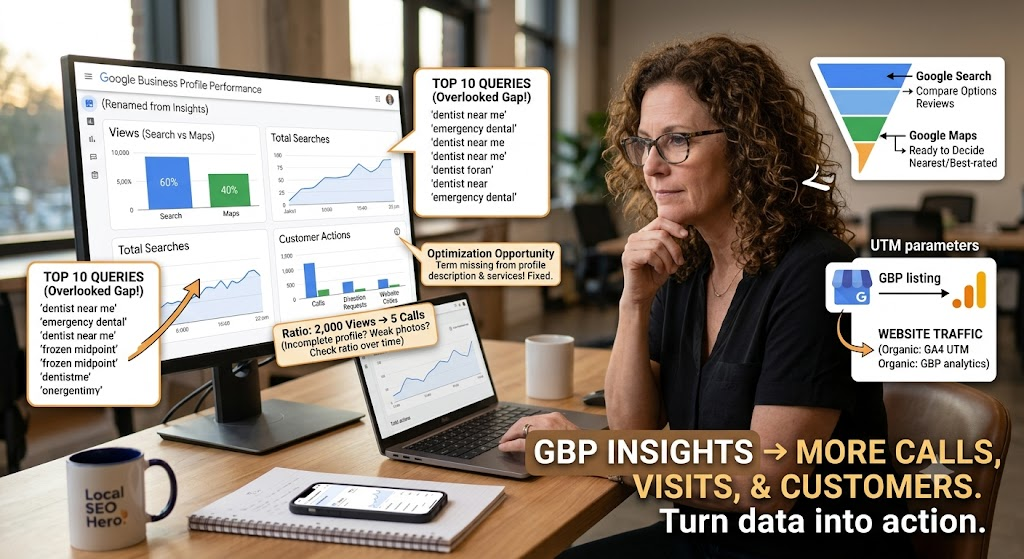
Knowing where your GBP performance data lives is the first step to using it. Here is how to get there.
For a Single Location
Go to business.google.com and sign in with the Google account connected to your business. Click your business name and select the Performance tab from the left menu. That is where all your google business profile insights data lives.
Always check your data on a desktop computer. The mobile version shows a simplified view and omits details like search query breakdowns. If you are trying to make real decisions from the data, the desktop gives you the full picture.
For Multiple Locations
You can then download a bulk report as a spreadsheet. This file shows GBP performance data for each location side by side, including views, searches, calls, direction requests, and website clicks. It is the fastest way to compare locations without clicking through each profile one by one.
You can then download a bulk report as a spreadsheet. This file shows performance for each location side by side, including views, searches, calls, direction requests, and website clicks. It is the fastest way to compare locations without clicking through each profile one by one.
How to Set Date Ranges and Export Data
Inside the Performance tab, use the date range selector to view the last 7 days, month, 6 months, or a custom period. GBP stores up to 6 months of performance history.
To export your gbp analytics data, go to Business Profile Manager, select your profile, click Actions, choose Insights, set the time period, and download the report. The file saves as a spreadsheet you can open in Excel or Google Sheets.
Always compare two time periods rather than reading a single snapshot in isolation. A one-time dip in views could mean anything. Three months of decline signals a real change that needs attention.
The 5 Core Metrics and What They Actually Mean
Before you can use your GBP performance data, you need to understand what each number is actually measuring. Here is a plain breakdown of every core metric in the dashboard.
Views
Views show how many times your Business Profile appeared on screen. Google counts Search views and Maps views separately. If the same person finds you on both surfaces in one day, that counts as two views, one for each.
Your count may also look lower than you expect. Google tracks unique visitors, not total impressions. If the same person views your profile three times in one day, it still counts as one. This shows how many people actually see your listing.
Searches and Search Queries
Total searches show how often your profile appears in results over a chosen time period. It includes both name searches and category searches like “emergency plumber near me” or “family dentist downtown.”
Below that number sits the search queries section. This is where Google Business Profile Insights shows the exact words people typed before your profile appeared. It is one of the most valuable sections in the entire dashboard and one of the most overlooked.
One important detail. Search query data refreshes at the start of each month and can take up to 5 days to appear. If the numbers look frozen mid-month, that is why.
Customer Actions
Customer actions capture everything a visitor does on your profile after finding it. This includes calls, direction requests, website clicks, messages, and bookings. Each action tells you something specific. Calls mean someone was ready to talk. Direction requests mean someone was ready to visit. Website clicks mean someone wanted more information before deciding.
Before reading this data, check one thing. Some actions only appear if you have enabled the matching feature on your profile. Turn off messaging, and the message count will show zero. Ensure your features are active before judging low numbers.
Google Search vs Google Maps
Search and Maps are two different places where your listing can appear. They attract different users with different intentions. Someone on Google Search is usually comparing options and reading reviews. Someone on Google Maps is often ready to decide. They are looking for the nearest or best-rated option.
When most of your views come from Maps, you are reaching people who are close to taking action. If most traffic comes from Search, you have strong visibility but may need a stronger profile to convert viewers into customers.
A Note on Photo Insights
If you are looking for photo performance data in your current dashboard, you will not find it. Google removed photo insights from the Performance tab. Many older articles still describe this feature as active but it no longer exists.
To evaluate photo performance now, watch for indirect signals. Check whether your overall profile views increase after adding new photos. Monitor direction requests and website clicks in the weeks following an upload. It is not a perfect replacement but it gives you a reliable working signal.
How to Use Search Query Data to Improve Your Profile
Search queries show the exact words people typed into Google before your profile appeared. This is the most actionable data in the dashboard and the most ignored. Look for terms appearing frequently that are not mentioned anywhere on your profile. These are your gaps. If a service you offer never shows up in your query data, Google does not associate your profile with it.
Add the service to your services, mention it in your description, and publish a Google Post. This sends Google three clear signals and helps your profile rank for those searches within weeks. Your top 10 queries are a free keyword research tool for your local market. Check how many appear in your description, services, and recent Google Posts. Any term in your queries missing from your profile is an optimization opportunity.
Search behavior shifts with the seasons. A landscaper sees “lawn care” spike in spring. A plumber sees “frozen pipe repair” surge in winter. An accountant sees “tax preparation near me” climb every January. The pattern is predictable so use it. Act one month before the spike, update your profile, and publish a Google Post early. By the time demand arrives your profile is already optimized.
How to Read Customer Actions (And What Low Numbers Are Telling You)
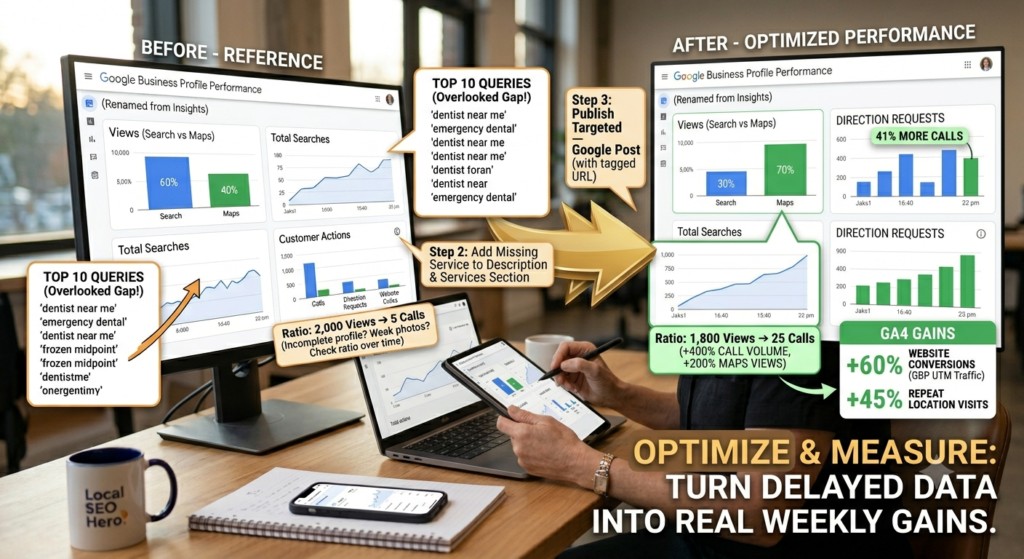
Views tell you how many people saw your listing. Actions tell you how many people did something because of it. Actions are the more important number in your GBP performance data. A business with 500 views and 50 calls is performing better than one with 2,000 views and 5 calls. High views with low actions means something is stopping people from taking the next step. That something is almost always an incomplete profile, weak photos, too few reviews, or missing contact information.
Calls are the strongest signal for most local businesses. Direction requests tell you how many people intended to visit. Website clicks mean someone wanted more information before deciding. Messages and bookings appear only when enabled, so ensure they’re on before judging low numbers.
Track the ratio between views and actions over time. Rising views with flat actions means your profile gets seen but doesn’t drive action. Both rising together means your optimization is working.
How to Use GBP Insights to Improve Your Local SEO
GBP analytics shows what is happening on your listing. To turn that data into real improvements you need the right tools and a simple routine.
Connect Your GBP Data to Google Analytics and Search Console
These three tools cover different parts of the same customer journey. Google Business Profile Insights shows what happens on your listing. Search Console shows how your website performs in search. GA4 shows what visitors do after they arrive. You need all three for the full picture. Connect GBP to GA4 using UTM parameters. Without them GA4 cannot tell a visitor came from your listing. Add this tagged URL to your website link inside GBP:
yourwebsite.com/?utm_source=google&utm_medium=organic&utm_campaign=gbp
Once set up, GA4 shows how much traffic your listing drives and whether visitors convert.
Use the Data to Optimize Your Profile
Start with your search queries report inside Google Business Profile Insights. Take the terms appearing most often and check whether they appear in your business description and services section. If they do not, add them using the exact language your customers are already using.
Then look at your actions data. Dropping calls means checking your hours and photos. High direction requests but low website clicks mean your profile drives foot traffic but not online interest. Every metric in your GBP performance data points to something specific you can act on.
Publish Google Posts consistently. Even one post per week covering a service, offer, or update keeps your profile active and relevant in Google’s eyes.
Set a Simple Weekly Review Routine
Every week check your views, total actions, and call count. Look for anything that dropped compared to the week before. Every month goes deeper. Review your search queries for new terms or gaps. Compare this month to last month. Check your discovery versus direct search ratio and look at whether recent Posts drove any lift in views or actions.
A one week dip means very little. A pattern across four weeks means something has changed and needs your attention.
Common Mistakes People Make With GBP Insights
- Confusing profile views with website visits. A profile view means someone saw your listing in Google results. It does not mean they visited your website. Profile views live in GBP Insights. Website traffic lives in GA4.
- Ignoring search queries. This is the most valuable section in the dashboard and the most skipped. The terms showing up in your queries tell you exactly what your local market is searching for. Not checking it means leaving free optimization data on the table every month.
- Reading raw numbers without comparing periods. A single number means nothing without context. 300 views this month sounds fine until you realize it was 600 last month. Always compare the current period to a previous one before drawing conclusions.
- Assuming low numbers mean failure. A local plumber serving one suburb doesn’t need thousands of monthly views to run a healthy business. What matters is whether the right people are finding you and taking action.
- Forgetting that data is delayed. General performance data updates every 2 to 3 days. Search query data refreshes at the start of each month and can take up to 5 days to appear. If your numbers look frozen, the data just has not updated yet.
- Checking on mobile. The mobile dashboard shows a stripped down version of your data. Search query breakdowns and other key details are only visible on desktop. Making decisions from the mobile view means working with incomplete information.
- Looking for photo insights that no longer exist. Google removed photo insights from the current dashboard. Stop searching for it; use indirect signals like view and action trends after photo uploads instead.
FAQs
What is Google Business Profile Insights?
Google Business Profile Insights is a free analytics tool showing how customers find and interact with your listing on Google Search and Maps. It tracks views, searches, calls, direction requests, and website clicks.
Why can I not find Insights in my dashboard?
Google renamed Insights to Performance in 2022. Look for the Performance tab in your left menu. Same data, new label.
How often does GBP data update?
Views and actions update every 2 to 3 days. Search query data refreshes at the start of each month and can take up to 5 days to appear.
Why do my GBP numbers not match Google Analytics?
Because they measure different things. GBP tracks activity on your listing. GA4 tracks behavior on your website. They measure different stages of the same journey.
Can I see who viewed my profile?
No, Google only shows aggregate totals. Individual user data is not available.
How far back does GBP data go?
Up to 6 months. For anything beyond that you would need previously saved export reports.
Conclusion:
Google Business Profile Insights shows how customers find and interact with your listing. Views show awareness. Actions show intent. Search queries reveal exactly what your local market is searching for. Every number in your GBP performance data points to something specific you can fix, update, or improve.
Businesses winning in local search are not doing anything extraordinary. They check their GBP analytics on a regular basis, update their profile based on what the numbers reveal, and stay consistent. That habit alone puts them ahead of competitors who set up a profile and never look at it again. Your listing is collecting data right now. The only question is whether you are using it. Open your Performance tab today, find one gap in your search queries, and fix it this week.

11 June 2026