


Businesses with photos get 42% more direction requests than those without.That one fact should change how you think about your Google Business Profile. Most local businesses lose customers because their photos are wrong.
You uploaded a few images and moved on. But blurry photos, stock images, and empty photo sections push customers toward your competitors. Google watches how people interact with your profile. It rewards businesses that look trustworthy and complete.
This guide shows you how to fix that. You will learn which photos Google favors, the right sizes and formats, how to handle customer photos, and how to build a photo strategy that supports your local rankings.
What Are Google Business Profile Photos?
Google Business Profile photos are images and videos that show up on your listing in Google Search and Google Maps. They show customers what your business looks like before they visit. They cover your storefront, team, products, and services in action.
Google has several photo categories. These include cover photos, logos, exterior shots, interior shots, team photos, product photos, and 360° virtual tours. Business owners upload photos through their profile dashboard. Customers can also add their own photos.
The average local business has only 11 photos on its profile. That number is very low. Businesses with more than 10 good GBP images get more direction requests, more calls, and more clicks. Strategic uploading matters more than most business owners realize.
Why Google Business Profile Photos Matter for Local SEO?
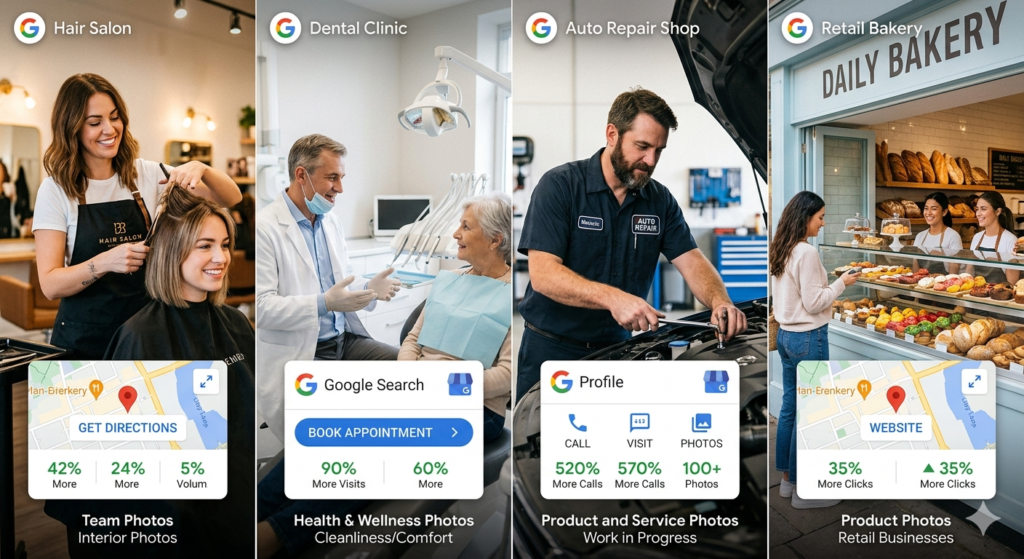
Photos affect how often your business shows up in local search and how many customers take action. Google confirms that businesses with google my business photos get 42% more direction requests and 35% more website clicks. For a hair salon, a dental clinic, or an auto repair shop, that means dozens of extra customers every month.
Customers form opinions in seconds. Good photos increase the chance of a visit by 90%. A profile with blurry or no photos loses customers before they read a single review.
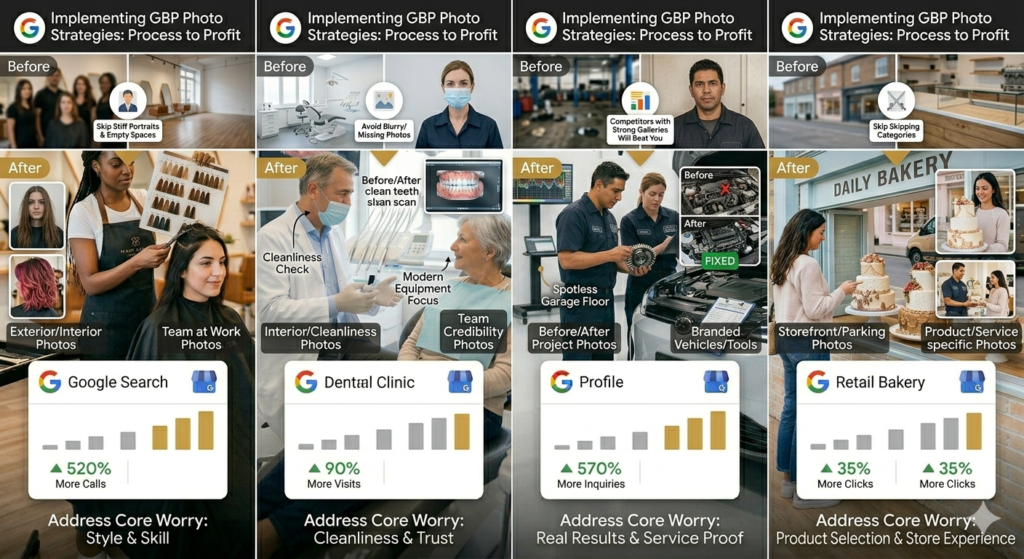
Businesses with 100 or more photos see 520% more calls than those with fewer than 10 photos. At higher photo volumes, Google sees your profile as active and trustworthy. Competitors with strong photo galleries will beat neglected profiles in both rankings and sales. Following Google Business Profile best practices for photos is one of the fastest ways to improve your local visibility without spending money on ads.
What Types of Google Business Profile Photos Should You Upload?
Google recommends GBP images across several categories. Each one serves a different purpose. Skipping any category leaves a gap that competitors will fill.
Cover Photo
Your cover photo is the most visible image on your profile. It shows up in Google Search results first. Upload it at 1200×900 pixels with a 4:3 ratio for the best display on all devices.
Keep the main subject centered. Google crops cover photos in search cards. Anything near the edges may get cut off. Pick an image that works as both a rectangle and a square.
Google does not promise to show your chosen cover photo. It may swap it for a customer photo it likes better. The best defense is a strong, centered, high-quality cover photo.
Profile Photo and Logo
Your logo shows up next to your business name in Search and Maps. Upload it at 720×720 pixels in PNG format. Use your real logo, not a product or team photo. Keep it centered with space around it so it looks good at small sizes.
Exterior Photos
Exterior photos help customers find your location. Upload at least 3 shots of your storefront, entrance, signage, and parking. Include day and night photos. Google Maps uses these to help with navigation and local search.
Interior Photos
Interior photos set clear expectations before a customer arrives. Show your layout, waiting areas, and atmosphere. For restaurants, clinics, salons, and retail stores, these photos drive the decision to visit. Focus on cleanliness and good lighting.
Team Photos
Team photos build trust before a customer contacts you. Real photos of your staff make your business feel human and credible. Skip stiff studio portraits. A photo of your team at work or serving a customer performs better every time.
Product and Service Photos
These photos show what you sell or deliver. For retail, upload shots of specific products like furniture, skincare items, or baked goods. For service businesses like painters or electricians, upload in-progress and finished project photos.
Before and after photos are very powerful for field service businesses. Google Vision AI links these visuals to your service type. This helps you show up in AI recommendations for local searches.
Industry-Specific Photo Priorities
The photos that work for a restaurant will not work for a plumber. Each business type needs different visuals. Your strategy should match what your customers want to see, not what looks good in general.
Restaurants and Food Businesses
Customers pick restaurants with their eyes. Upload clear photos of your dishes, daily specials, and seasonal items. Show the dining room during busy hours. Update food photos as your menu changes.
Service Businesses
Customers need proof before they call a plumber, electrician, or HVAC company. Upload photos of your team on real job sites, branded vehicles, and tools in use. Before and after photos are your strongest asset. They prove you can solve the problem.
Retail Businesses
Retail customers want to see what you sell before they make the trip. Upload product shots of top items like clothing, furniture, or food. Show your storefront from the street. Add photos of customers shopping to build social proof.
Health and Wellness Businesses
Patients check comfort and cleanliness before they book. Upload photos of your reception area, treatment rooms, and equipment. Show staff in uniform. A clean, bright treatment room builds more trust than any description.
The Rule That Applies to Every Business
Match your photos to what your customers worry about most. A restaurant customer worries about food and atmosphere. A contractor’s customer worries about results. A clinic patient worries about cleanliness. Find that core worry and address it with your photos.
Photo Specs, Sizes, and Format Requirements
Wrong sizes and formats are common mistakes. Google Business Profile guidelines have clear rules for every photo type. Images that break these rules look bad, get flagged, or fail to upload. Every photo must meet these standards. File size must be between 10KB and 5MB. Minimum size is 720×720 pixels. Only JPEG and PNG are accepted.
Recommended Sizes by Photo Type
| Photo Type | Recommended Size | Aspect Ratio |
| Cover Photo | 1200 × 900px | 4:3 |
| Profile / Logo | 720 × 720px | 1:1 |
| Interior / Exterior / Team | 1200 × 900px | 4:3 |
| Product Photos | 1200 × 900px | 4:3 |
| 360° Photos | 4K resolution | 2:1 |
JPEG vs PNG
Use JPEG for most photos like exteriors, interiors, and team shots. It gives smaller file sizes with good quality. Use PNG for your logo and images with text or sharp edges. PNG keeps edges clean and supports transparency.
Why Low-Quality Uploads Hurt Your Profile
Google flags poor images and may push them down in results. It may replace them with customer photos it prefers. Bad images also push customers away before they take action. Following Google Business Profile post guidelines and photo guidelines together keeps your entire profile in good standing.
Tools to Use Before Uploading
TinyPNG shrinks JPEG and PNG files with no visible loss in quality. Canva lets you resize images to exact pixel sizes and save in the right format.
File Naming and the Geo-Tagging Question
Rename every image before you upload it. Google reads file names as signals. Instead of IMG_4823.jpg, use names like family-dentist-reception-chicago.jpg or emergency-plumber-pipe-repair-boston.jpg. Use lowercase letters and hyphens. Add your service type and location where it fits.
Geo-tagging does not help your rankings. Google removes all EXIF data including GPS info when you upload. But uploading photos from your phone while at your location is still worth doing. Google checks GPS data at upload to confirm the photo matches your address.
What actually helps is photo quality, relevance, and engagement. A real photo of your workspace with a good file name will always beat a geo-tagged stock image.
How to upload and manage photos on your Google Business Profile
Managing your google business photos is not a one-time job. It takes a steady approach to uploading, updating, and removing images to keep your profile active. This is a core part of Google Business Profile optimization best practices.
How to Add Photos Step by Step
Adding photos takes less than two minutes. On the desktop, go to your profile, click Photos, pick the right category, and upload from your computer. On mobile, open Google Maps, find your profile, tap Photos, and upload from your camera roll.
After uploading, photos go through a short review. Only you can see them during this time. It usually takes a few minutes to a few hours. If a photo is still pending after 24 hours, we may have flagged it.
How Often You Should Upload New Photos
Google recommends at least one new photo per week. Profiles that go more than 30 days with no update enter the 30-Day Danger Zone. Visibility starts to drop.
Upload 3 to 5 photos every two weeks. Shoot regular moments like finished jobs, new products, or team updates. Steady phone photos beat large batches of professional shots uploaded once.
How to Remove or Replace Photos
Go to the Photos section, pick the image, and click the trash icon to delete it. You can only remove photos you uploaded.
Check your photo library every three months. Remove old branding, stopped products, or spaces that look different now. Old photos signal a neglected profile to both Google and customers.
Managing Customer-Uploaded Photos
Google lets any user add photos to your profile. It actively encourages this. Customer photos feel more real than owner uploads. But you cannot control what gets added. You must monitor your profile on a regular basis.
Photos added with Google reviews carry extra weight. Reviews with photos stay visible up to 10 times longer than text-only reviews. Ask customers to add a photo when they leave a review. It helps both your reviews and your photo gallery.
Check your customer photos at least once a week. Go to Photos and select the By Customer tab. If a photo breaks Google’s rules, click the flag icon, pick a reason, and submit. Google usually reviews the report within a few business days.
Google Business Profile Guidelines for Representing Your Business Through Photos
The Google Business Profile guidelines for representing your business extend beyond just text. Photos must also follow these rules. Google’s guidelines for representing your business on Google state that all images must show your actual business. They must not mislead customers or misrepresent your services.
Key points from the Google Business Profile guidelines representing your business on Google:
- Photos must be real images of your actual location, team, or products
- No stock or AI-generated images in place of real business photos
- No watermarks or heavy text overlays that cover the subject
- No adult content or images that violate Google’s content policies
- Images must accurately represent what your business offers
Following these Google guidelines protects your profile from being flagged or suspended. A suspended profile loses all visibility in Google Search and Maps. The Google business profile guidelines representing your business exist to keep local search trustworthy for customers and fair for businesses.
Common Google Business Profile Photo Mistakes to Avoid
Using stock photos is the worst mistake you can make. Google Vision AI spots stock images across millions of profiles. It marks them as fake. This hurts your trust score and drops your visibility.
Uploading blurry or dark photos signals neglect. Google may swap your bad uploads for customer photos it prefers. Every photo should be sharp, well-lit, and at least 720×720 pixels.
Treating photos as a one-time task is a strategy error. Profiles with no new uploads for 30 days lose visibility. A still photo library tells Google your business is inactive.
Breaking Google Business Profile guidelines on photos can get images removed or flag your profile as spam. Common mistakes include text overlays, watermarks, and duplicate uploads.
How to Build a Long-Term Photo Strategy for Local SEO
Photos are not a one-time job. They are an ongoing ranking signal. Google tracks an Activity Score based on how often you update your profile. Businesses that upload on a steady schedule beat rivals with higher ratings but fewer GBP images.
This is the foundation of best practices for GBP management. A complete Google Business Profile optimization checklist always includes photo uploads as a recurring monthly task, not a one-time setup step.
Start Fast for New Profiles
Upload your cover photo, logo, 3 exterior shots, 3 interior shots, and 3 team or product photos in the first week. Hitting 10 photos fast brings quick gains in calls, clicks, and direction requests.
Stay Consistent
Most local businesses upload a few photos and stop. A business that adds fresh google my business photos every two weeks will beat a rival with better photos but a dead profile. Consistency wins every time.
Combine Photos With Posts for Maximum Impact
Google Business Profile posts and photos work together. When you finish a job, upload the photo and post on Google Business about it the same day. When you launch a new product, add the product photo and write a google business post that links directly to it. This combined approach drives both clicks and engagement signals.
Posting on Google My Business regularly alongside photo updates signals to Google that your google business listing is active across multiple content types. GBP posts paired with fresh photos create a stronger activity signal than either one alone.
Use Google Business Profile Updates Strategically
Google Business Profile updates both photo uploads and written posts work together to build your prominence score. Treat every google business profile update as a two-part action: add a relevant photo and write a short post about it. This doubles the engagement signal from a single piece of content.
Google Business Profile Optimization Tips for Photos
These Google Business Profile optimization tips focus specifically on getting the most from your image strategy:
- Name every file with your service type and city before uploading
- Upload photos in all available categories do not leave any section empty
- Use the Google Business Profile dashboard to check which photos get the most views
- Rotate seasonal photos to keep your gallery current
- Respond to customer photo activity by checking the By Customer tab weekly
- Combine your google my business photos strategy with regular GBP posting for stronger overall signals
Google Business Profile optimization 2025 best practices now extended into 2026 consistently point to photo frequency and quality as two of the highest-impact actions a local business can take. The google business profile optimization checklist for any serious local business must include a recurring photo schedule.
Are Google Business Profile Photos Still Important for Local SEO in 2026?
Yes. They matter more in 2026 than ever before. Google now favors visual search. AI Overviews, Google Maps carousels, and local search panels all push businesses with rich, fresh GBP images ahead of those using only text.
Google Vision AI no longer sees photos as decoration. Every image is checked for relevance, trust, and business proof. Profiles with real, frequent visual content show up more in AI results and local search.
Google Business Profile optimization best practices in 2026 treat photos as a continuous ranking input not a profile setup step. Businesses that keep their google my business photos active will lead local search. Those that stop uploading will fall behind as rivals with active profiles pull ahead.
FAQs
How do Google Business Profile photos impact rankings and visibility?
Photos boost rankings by driving clicks, views, and time spent on your profile. More engagement tells Google your profile is relevant. Active profiles with fresh GBP images rank higher in local search and Google Maps.
What makes a high-quality Google Business Profile photo?
A good photo is sharp, well-lit, and shows your real business. It avoids heavy filters and reflects your actual services or space. Real photos build more trust and drive more action than edited or stock images.
What happens if you don’t add photos to your Google Business Profile?
Profiles with no photos get fewer clicks and less trust. Customers prefer visual listings. Rivals with photos get more engagement and outrank you in local results.
How often should you update Google Business Profile photos?
Upload 3 to 5 new photos every two weeks. Profiles that go 30 days with no update can lose rankings. Regular uploads tell Google your business is open and active. This is one of the core Google My Business best practices for staying competitive.
How do you optimize Google Business Profile photos for better results?
Use high-resolution images, real business visuals, proper formats, and clear file names. Keep uploads consistent. Match photos to your services and update them often. Follow Google Business Profile guidelines on image size and format at every step.
Can stock or AI-generated photos hurt your Google Business Profile?
Yes, Stock and AI images lack the real proof Google looks for. Google Business Profile guidelines for representing your business require authentic images. Fake or generic images reduce trust and hurt your visibility in local search.
Conclusion
Google Business Profile photos are one of the most powerful tools for local search. Businesses with real, fresh google my business photos get more clicks, more calls, and more customers. The rules are simple. The edge comes from staying consistent.
Start today. Upload your cover photo, logo, exterior shots, interior shots, and team photos. Hit the 10-photo mark fast. Then add 3 to 5 new GBP images every two weeks. Check customer uploads weekly and clean out old photos every three months.
Google rewards active businesses. Your photos prove you are one. Audit your profile today, fix what is missing, and commit to a simple upload schedule that keeps you ahead of the competition. Combine your photo strategy with regular google business profile posting and google business profile updates to build the strongest possible local presence.
If this guide helped you, share it with a local business owner who needs it!


10 June 2026